Liquid Web VPS Review: Powerful Hosting—If You Choose the Right Management Level
Liquid Web sells two materially different VPS experiences. Cloud VPS starts at $5 per month and gives experienced administrators raw, scalable infrastructure. Fully managed VPS starts at a promotional $36 per month for two months, then $72, and adds server setup, monitoring, supported updates, control-panel assistance and 24/7 access to technicians.
This Liquid Web VPS review compares those offers fairly, calculates ongoing costs, explains the legal uptime terms and shows when managed VPS is worth paying more for.
Is Liquid Web VPS worth it?
Choose fully managed VPS if a server outage or security mistake costs more than the $72-per-month regular entry price. It combines root access and isolated resources with OS/control-panel assistance, monitoring, migrations and a clear upgrade path.
Choose self-managed Cloud VPS if you can administer Linux securely. Its $5 entry plan is genuinely inexpensive, hourly priced and scalable—but you own patching, hardening, troubleshooting and recovery. Beginners who only need WordPress should usually choose an application-managed plan instead of becoming a server administrator.
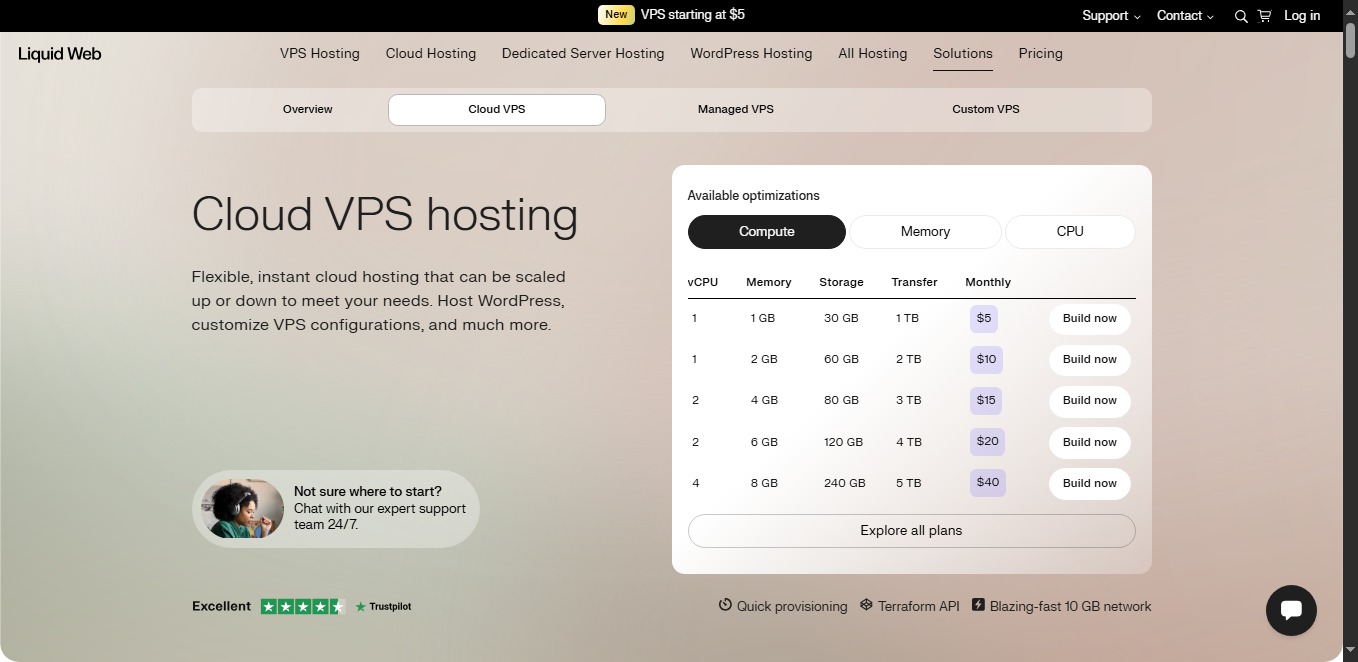
Table of contents
At a glanceWhat Is Liquid Web VPS Hosting?
A virtual private server partitions physical infrastructure into isolated virtual machines with reserved CPU, RAM and storage allocations. Liquid Web’s cloud platform adds quick provisioning, root access, a dedicated public IP, API access, hourly-equivalent pricing and vertical resizing without a manual migration.
Unlike shared hosting, you control the operating system and server stack. Unlike dedicated hardware, the virtual resources can be resized quickly and do not require renting an entire machine. Liquid Web offers general/compute, memory-optimized and CPU-optimized Cloud VPS shapes.
The crucial distinctionManaged VPS vs Self-Managed Cloud VPS
| Area | Self-managed Cloud VPS | Fully managed VPS |
|---|---|---|
| Starting price | $5/mo | $36/mo for two months; $72/mo regular |
| Root access | Included | Included |
| OS updates and patches | Your responsibility | Covered for supported configurations |
| Monitoring | You configure/manage | Supported monitoring and alert response |
| Control panel | Optional/self-administered | InterWorx, cPanel or Plesk options |
| Application development | Your responsibility | Still your responsibility |
| Best user | Experienced sysadmin or DevOps team | Business that needs infrastructure help |
Liquid Web also documents a core-managed level between those extremes, but the current public VPS buying journey emphasizes self-managed and fully managed choices. Confirm the exact management designation on the order.
Current fully managed rangeLiquid Web Managed VPS Plans
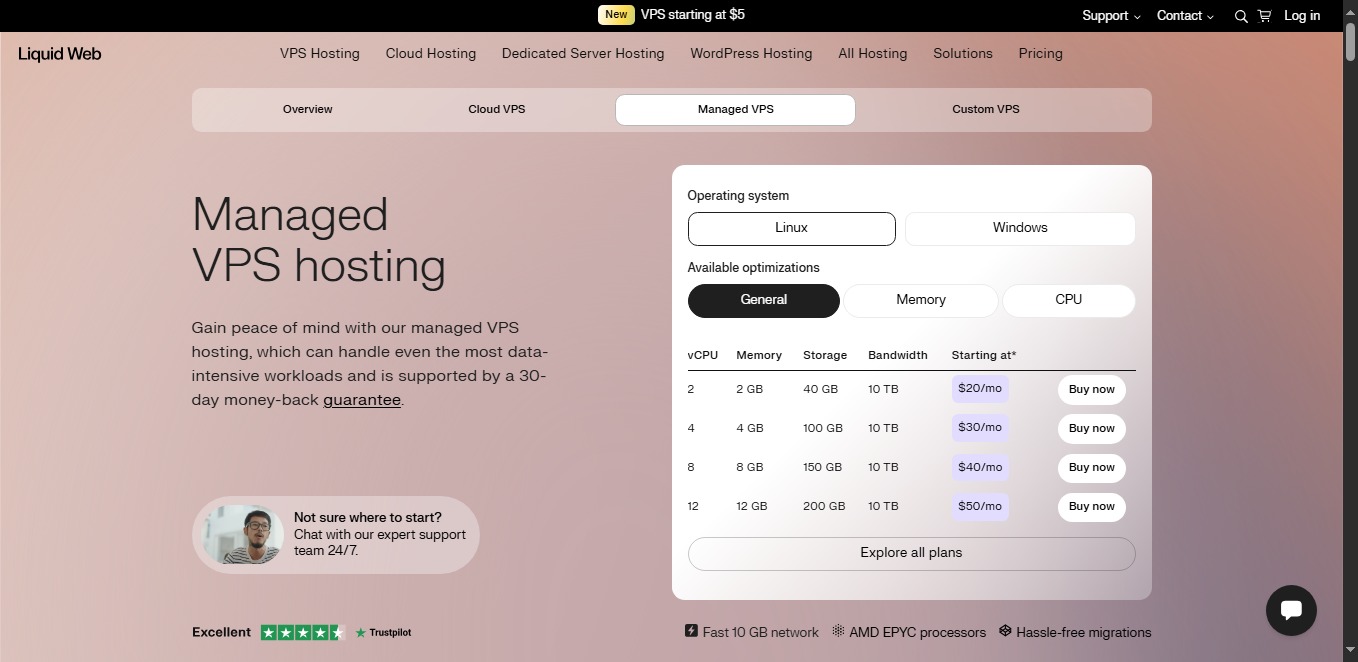
Every published managed tier includes full management, root access, a dedicated IP, DDoS protection, unmetered inbound traffic, API access, fast provisioning, Windows availability and supported control-panel choices. Promotions apply to eligible new accounts and do not represent the ongoing bill.
| Plan | Intro price | Regular price | vCPU | RAM | SSD | Outbound transfer |
|---|---|---|---|---|---|---|
| 4 GB | $36/mo, 2 months | $72/mo | 2 | 4 GB | 80 GB | 3 TB |
| 8 GB | $50/mo, 2 months | $100/mo | 4 | 8 GB | 240 GB | 5 TB |
| 16 GB | $72.50/mo, 2 months | $145/mo | 6 | 16 GB | 440 GB | 7 TB |
| 24 GB | $89/mo, 2 months | $178/mo | 6 | 24 GB | 540 GB | 8 TB |
Managed VPS RAM and regular monthly price
Column height represents RAM; labels show the ongoing rate after the two-month promotion.
Best managed starting point: the 4 GB plan for typical business sites and modest applications; resize after measuring real RAM and CPU use.
View Managed VPS Plans →For server administratorsSelf-Managed Cloud VPS Pricing
Cloud VPS bills a flat monthly maximum with published hourly equivalents and credits unused resources on a prorated basis. Unlimited inbound transfer is included; the allowance in the table is outbound bandwidth. The $5 plan is useful for small services, testing and light workloads, but 1 GB leaves little room for a control panel and a busy database.
| Compute shape | Monthly | Hourly | vCPU | RAM | SSD | Transfer |
|---|---|---|---|---|---|---|
| 1 GB | $5 | $0.007 | 1 | 1 GB | 30 GB | 1 TB |
| 2 GB | $11 | $0.015 | 1 | 2 GB | 60 GB | 2 TB |
| 4 GB | $17 | $0.023 | 2 | 4 GB | 80 GB | 3 TB |
| 6 GB | $22 | $0.030 | 2 | 6 GB | 120 GB | 4 TB |
| 8 GB | $45 | $0.062 | 4 | 8 GB | 240 GB | 5 TB |
| 12 GB | $67 | $0.092 | 4 | 12 GB | 320 GB | 6 TB |
| 16 GB | $90 | $0.123 | 6 | 16 GB | 440 GB | 7 TB |
| 24 GB | $123 regular | $0.168 | 6 | 24 GB | 540 GB | 8 TB |
| 32 GB | $179 regular | $0.245 | 8 | 32 GB | 640 GB | 10 TB |
The 24 GB and 32 GB compute cards currently show 50% off for two months. Memory-optimized and CPU-optimized shapes use different CPU, RAM, storage and hourly ratios.
Like-for-like mathWhat Does Management Cost?
The self-managed and fully managed 4 GB plans use the same published 2 vCPU, 80 GB SSD and 3 TB transfer allocation. Their regular prices are $17 and $72 per month respectively. The $55 difference pays for the managed service layer and supported control-panel environment—not extra base resources.
Regular monthly cost at comparable resource levels
The management premium varies by tier and configuration.
A two-month promotion does not reduce the recurring invoice. At current rates, the first year of the 4 GB managed plan is $648: two months at $36 and ten at $72. Twelve months at the undiscounted rate would be $864, before licenses, taxes and backup upgrades.
Test your workloadPerformance and Reliability Assessment
Liquid Web’s current VPS stack advertises SSD storage, dedicated virtual resources, fast provisioning and 10 Gbps network connectivity. Self-managed plans can scale vertically with minimal disruption; the API and Terraform-compatible workflow support automated deployments.
Those are good foundations, not proof of a specific website speed. Precise uptime, response-time and throughput figures are meaningless without a dated, reproducible test record. Theme, code, database queries, cache state, visitor region and concurrent demand can matter more than the provider name.
- Baseline: record CPU steal, RAM use, swap, disk latency and database response on the existing host.
- Production-like test: clone the application and use the same software, data and cache rules.
- Load test: increase concurrent users gradually while tracking latency and errors.
- Front-end check: use Google’s Core Web Vitals guidance for real-user loading, responsiveness and stability.
Included capabilitiesVPS Features That Matter
Root access
Install packages and configure the server, while respecting the boundaries of managed support.
Vertical scaling
Add CPU, RAM and storage as demand grows without a conventional manual migration.
Network and transfer
Unlimited inbound traffic, published outbound allowances and a dedicated IP.
Panel choice
InterWorx, cPanel and Plesk are available; licensing can affect the total invoice.
Linux or Windows
Windows is available on applicable plans; confirm licensing and management differences.
Migration assistance
Liquid Web can move eligible sites, databases, email and panel accounts with staged verification.
WordPress can run on VPS, but root access and server management are unnecessary for many site owners. Check themes and extensions against the current WordPress requirements, then compare application-managed hosting before choosing a server.
Know the boundaryWhat Fully Managed Support Covers
Liquid Web’s documented fully managed scope includes supported OS and control-panel updates, monitoring, troubleshooting core services such as Apache and MySQL/MariaDB, basic security consultation, network/hardware assistance, DDoS protection and help configuring or restoring supported backup products.
It does not include custom application development, website administration, plugin/theme customization, .htaccess or cron customization, database/code optimization, SEO or extensive server tuning. The provider manages the supported platform; you remain responsible for the application and business.
| Task | Self-managed | Fully managed | Customer responsibility remains |
|---|---|---|---|
| Hardware/network faults | Provider assists | Provider assists | Report useful diagnostics |
| OS and panel patches | You handle | Supported configuration covered | Approve disruptive changes |
| Core services | You troubleshoot | Provider investigates supported services | Application-specific behavior |
| Monitoring | You configure | Available with managed monitoring enabled | Business transaction monitoring |
| Code and database tuning | You handle | Not included beyond basic consultation | Developer or specialist work |
Marketing pages promote a 59-second phone/chat response, but the legal SLA says support strives for chat replies in under one minute and tickets within one hour—and states those initial-response targets are not guaranteed. An initial reply is not a resolution.
Shared responsibilitySecurity and Backups
Cloud VPS includes an integrated firewall, basic Server Secure package, standard DDoS mitigation and root access. Liquid Web’s support documentation describes included Layer 4 mitigation up to 2 Gbps, with stronger and application-layer protection available as add-ons.
Built-in backup capability does not always mean an independent disaster-recovery copy. Panel backups can remain on the VPS; server images and Acronis Cyber Backups provide different recovery options and storage locations. Confirm capacity, retention, encryption, restore granularity and cost. Test a restore before you need one, and follow the CISA ransomware guidance by maintaining protected backups that cannot be altered from a compromised production account.
Two different promisesServer Uptime vs Network Uptime
The managed VPS product page advertises a 99.9% server uptime guarantee. Separately, Liquid Web’s legal policy guarantees 100% network uptime, defined as reachability of major routing devices from the global internet. Neither means every application will be available every second.
The legal network SLA excludes scheduled maintenance, hardware/software maintenance, malicious attacks and other listed events. Its credit remedy is described specifically for eligible dedicated-hosting clients, so VPS buyers should ask sales to identify the VPS remedy in their order terms rather than assuming the dedicated-server formula applies.
Practical sizingWhich Liquid Web VPS Plan Should You Choose?
Choose $5–$17 Cloud VPS for learning and small services
The 1 GB and 2 GB plans suit lightweight services, test environments and administrators comfortable with a lean Linux stack. The $17 4 GB shape is the fair resource comparison with managed entry.
Choose 4 GB managed for business websites
Two vCPU, 4 GB RAM and 80 GB SSD are a reasonable baseline for several modest sites or one application. Budget $648 for the first year at the current promotion, then $864 per full-price year before extras.
Choose 8–16 GB after measuring pressure
Move up when monitoring shows sustained memory, CPU, storage or transfer constraints. The 8 GB tier doubles CPU and triples storage over managed entry; the 16 GB plan adds two more vCPU and 200 GB SSD.
Consider dedicated resources beyond 24 GB
If a single workload consistently needs the top VPS tier, compare cloud dedicated or bare metal rather than scaling by habit. Our broader Liquid Web review explains those products.
For smaller budgets, compare simpler hosting in our Bluehost vs Hostinger guide. WordPress users who want application management rather than a server can use our Cloudways vs WP Engine comparison to understand that distinction.
Balanced assessmentLiquid Web VPS Pros and Cons
Pros
- Genuine $5 self-managed entry
- Clear managed resource allocations
- Root access on both paths
- Fast vertical resizing and API
- Linux and Windows availability
- Multiple supported control panels
- 24/7 support and migration help
- 100% network uptime policy
Cons
- Managed headline rates last only two months
- $72 regular managed entry is premium
- No universal 30-day VPS refund
- Panels and backup capacity may add cost
- Management excludes development and tuning
- Support marketing and legal SLA differ
- Backup wording requires configuration checks
- Not beginner-friendly without management
How we weighted the verdict
- 30% resources, scaling and performance design
- 25% reliability, security and backups
- 20% management and support scope
- 15% ongoing value and price clarity
- 10% usability and migration
Our default managed pick: start at 4 GB, monitor real usage and scale only when the data justifies it.
Compare Liquid Web VPS Plans →Common questionsLiquid Web VPS FAQs
Does Liquid Web VPS really start at $5?
How much is fully managed VPS after the promotion?
Does Liquid Web VPS include root access?
Can I host unlimited websites?
Are cPanel and Plesk free?
Are backups included?
Can I get a refund within 30 days?
Final verdict: excellent choice, but compare the regular bill
Liquid Web VPS earns 8.8/10. It offers an unusually broad bridge between affordable self-managed infrastructure and genuinely useful managed server assistance. Root access, predictable resources, a 10 Gbps network, vertical scaling, migration help and multiple panels make it a strong business platform.
The main trap is price framing: $5 and $36 describe different management levels, and the managed discount lasts only two months. Judge managed VPS at $72–$178 per month, add panel and backup costs, and document the support and SLA terms before production.
Check Current VPS Pricing →Sources & comparison methodology
Research date: September 19, 2026. We reviewed Liquid Web’s live managed VPS and Cloud VPS pages, full pricing page, management/support scope, migration documentation, backup FAQ, tariff and service-level agreement.
Method: Introductory and regular prices are shown separately. Like-for-like management comparisons use matching published CPU, RAM, SSD and transfer allocations. Scoring weights are resources/scaling 30%, reliability/security/backups 25%, management/support 20%, ongoing value 15%, and usability/migration 10%.
Limits: We do not publish synthetic performance numbers without reproducible configuration, location, workload, cache and sample data. Promotions, licenses and configurations can change; the checkout and signed terms are authoritative.
Affiliate disclosure: We may earn a commission if you buy through a marked link, at no extra cost to you. This does not change our assessment. Verify the ongoing price, management designation, license fees, backups, refund policy and SLA before ordering.