Whop Review: Features, Fees, Pros, Cons & Who It’s Best For
Whop is an all-in-one platform for selling online products, memberships, courses, services and software. It combines branded product pages and checkout with community apps, payment processing, payouts, affiliate tools, advertising and an API layer for platforms. This review unpacks what those pieces actually do, the published fees, where the product fits, and the details to check before you build a business around it.
Review method: I reviewed Whop’s public product pages, current pricing documentation, help content and legal terms. This is a product and policy review, not a claim of a completed test transaction or access to a private seller account. Plan, payment-method and feature availability can vary by country and account.
Whop review: the short version
Whop works best when you need more than a payment button: it gives sellers product pages, checkout, access controls and modular apps for delivering communities, courses, software access, services or events. Its payment network and developer tools also extend beyond the marketplace, giving platform teams a way to embed parts of commerce and payouts.
The main trade-off is scope. Marketplace listings, seller apps, Whop Payments and the developer network are related but distinct routes, and each can have different eligibility, fees and operational responsibilities. Treat the advertised domestic card rate as a baseline; international processing, currency conversion, financing, optional tax or billing tools, disputes and payout methods can change the total cost. Sellers still own the product, customer promises and many of the business obligations.
Verdict: a strong, flexible home for a monetized digital offer when its integrated checkout and delivery tools fit your workflow. Budget time to learn the settings and verify the real buyer journey before scaling.
What is Whop?
Whop is an internet-business platform where people can create a business page, list products, take payments and give customers access to the thing they bought. A seller’s business space is commonly called a whop. It can contain one offer or several products, pricing options and apps—for example, a course plus a community chat and a resource library.
For a buyer, Whop is also a marketplace and product-discovery destination: shoppers can find listings, compare plans, read visible reviews and buy access. For a seller, it is the commerce and delivery layer behind those offers. For a technology company, Whop Payments Network and its developer tools can provide payment acceptance, payouts or embedded commerce components inside the company’s own product.
That distinction matters because feature availability and pricing are not identical across every route. A creator selling a membership on a Whop storefront, a merchant using a Whop checkout on their own site, and a software platform embedding Whop’s payments infrastructure may encounter different fees, tax responsibilities and onboarding processes. This review covers the broad platform and flags when a detail depends on the seller’s setup.
How Whop works: marketplace, seller tools and payment network
Think of Whop as several connected layers rather than one single-purpose app. A seller creates an offer and decides how people pay. They add the apps needed to deliver the offer. Whop processes the purchase and manages access; the seller promotes the offer, fulfils what was promised, supports customers and monitors performance. Larger platforms can use APIs or embedded components instead of presenting Whop as their main storefront.
Users may encounter the marketplace first, but a seller can also bring buyers directly from a website, social media, an email list or an embedded checkout. Whop describes seller sales both on the Whop marketplace and through seller-owned websites or other channels using Whop Payments. The product is therefore not only a marketplace listing site, and a seller does not need to rely entirely on marketplace discovery.
Whop features: a detailed breakdown
Whop is a stack of connected tools. The clearest way to evaluate it is to follow the work a seller has to do: present an offer, price it, deliver it, collect payment, support members and find new customers.
01Product pages and storefronts
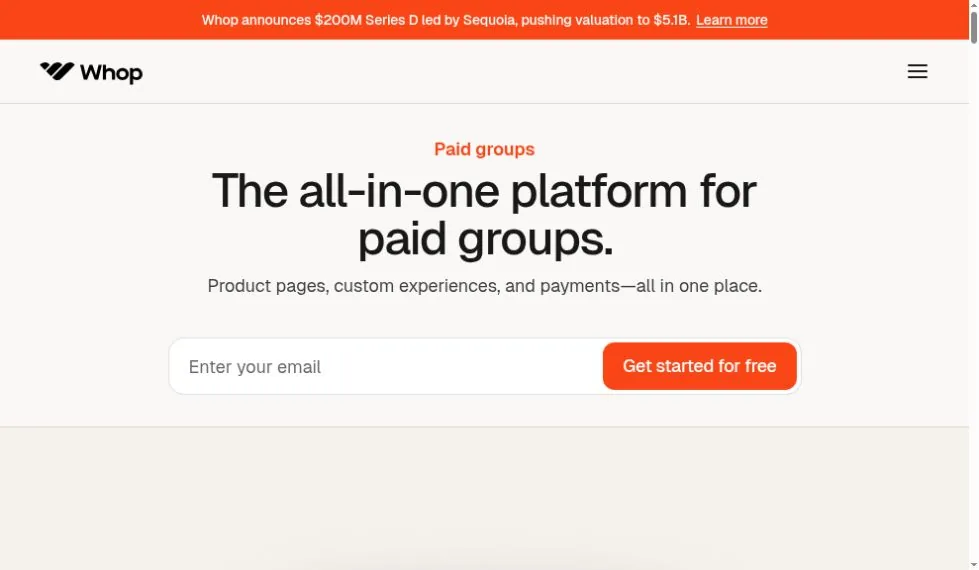
Whop gives sellers a public-facing page for a business and individual offers. Product pages can describe the offer, show pricing choices and explain what the buyer receives. Whop’s paid-groups product page describes customizable product pages with brand elements, pricing tiers, testimonials and FAQs. A seller can use these pages as the main sales destination or pair them with other marketing pages and embedded checkout.
A well-built page can help clarify an offer, but page templates do not substitute for positioning or proof. Sellers still need accurate claims, clear renewal terms, authentic testimonials, usable images, refund rules and a support contact. A visitor should be able to understand the price, billing cadence, renewal behavior and access conditions before buying.
02Flexible pricing and access plans
Whop plans can support recurring subscriptions or one-time purchases. Sellers can configure monthly or annual access, lifetime access, trials, split payments/installments, free access and paid upgrades, subject to payment method, country and product eligibility. A product may have more than one plan, such as a basic membership and a higher tier with coaching or extra course content.
Common pricing mechanics include initial and recurring prices, a trial period, an expiration date, limited stock, waitlists, free trials and custom checkout fields. These options are powerful but raise the cost of confusion: review every plan as a buyer would, especially when an introductory price rolls into a renewal amount.
03Modular apps for delivering the product
Apps are the product-delivery and engagement modules installed in a whop. Whop’s own courses guidance describes apps as modular building blocks that can be added, removed or swapped, with more than 20 available at the time of that article. The catalog evolves, so check the live App Store for current listings and plan limitations.
Other app types and app-store listings can include onboarding, announcements, directories, forms, leaderboards, rewards and niche tools. Treat this as a representative feature map, not a guarantee that every app is native, free, supported in every region or suitable for your account. Review the app description, data handling and maintenance history before making an app central to a paid product.
04Customer access and member management
Paid access can be tied to a purchase plan and its billing status. The seller dashboard helps the team see who joined, when they joined and what they pay, manage access, send announcements and track engagement. This is useful for membership businesses because selling and access provisioning are connected: a customer can purchase a plan and receive entry to the associated content or community.
For support teams, member records and payment history are operationally important. Define how to handle upgrades, cancellations, failed renewals, duplicate accounts and refund requests before a launch. If your business depends on external platforms such as Discord or Telegram, verify how connection, role assignment and revocation behave in the exact integration you intend to use.
05Payments, checkout and global payment methods
Whop provides checkout for products sold on its platform and payment components for other surfaces. Its documentation lists cards and wallets, ACH for U.S. bank accounts, local payment methods, cryptocurrency in supported flows and installment providers such as Klarna and Afterpay. Whop says its payment documentation covers 100+ payment methods, 135+ currencies and 195 countries. Availability is not universal: the buyer’s country, currency, seller setup, product and payment partner all affect what appears at checkout.
Checkout supports configuration and custom fields, and can be embedded into an outside website. Payment features also include automated card updates, retries and payment routing/orchestration options. Some of these optimization features have additional fees. Do not assume every feature is switched on by default or included in the base processing rate.
06Billing, subscriptions and retention
For recurring products, billing includes subscription lifecycle management, invoices, renewals and payment recovery tools. Whop’s pricing documentation lists automated billing and retries as an optional revenue-optimization component with its own rate. Failed-payment recovery can reduce involuntary churn, but it does not replace clear cancellation and renewal communication or a support process for billing questions.
Seller plan configuration determines a lot of the customer experience: trial duration, renewal date, billing interval, taxes, expiration and cancellation. Set up test plans and read the checkout page line by line before sending traffic. A single confusing trial-to-paid transition can generate disputes and reputational damage.
07Affiliate and partner programs
Whop includes affiliate functionality for sellers who want partners to promote their products. A seller can set commission terms and provide trackable links or assets; affiliates can see their own attributable activity and earnings. Whop’s developer docs also explain affiliate attribution for checkout embeds on a seller’s own website. Affiliate payouts can carry additional processing fees, so calculate commissions and transaction costs together before announcing a program.
Affiliates need clear rules: permitted promotional claims, disclosure language, attribution windows, commission reversals on refunds, payout timing and prohibited traffic sources. Treat affiliate marketing as a managed sales channel, not automatic free growth.
08Whop Ads and on-platform promotion
Whop offers advertising tools through a seller dashboard. Its ads terms describe on-platform ads that can appear in search results and prominent platform locations, with sellers setting a daily budget and being charged on a cost-per-click basis. Whop also describes off-platform campaign management and announced Meta integration; some advertising products have been in beta. Campaign availability, placements, bidding and fees can change, and ad spend is separate from payment processing fees.
Ads can amplify a proven offer, but they cannot repair poor retention, misleading sales copy or a weak product. Start with a capped test budget, define what counts as a qualified purchase, review refund and chargeback rates, and verify the exact placement and billing rules in the current Ads interface before launching.
09Content Rewards, bounties and ways to earn
Whop’s broader ecosystem includes earning opportunities such as clipping, user-generated content and task or bounty campaigns. Businesses can reward contributors for approved content or work, while users can seek projects without first launching a product of their own. This creates an additional acquisition and gig-work layer around the seller marketplace. Campaign participation, eligibility, reward terms and payout conditions are defined by each opportunity; users should read those terms carefully.
10Analytics and seller operations
Seller dashboards bring together information about products, payments and customer activity. Depending on the tools enabled, operators can monitor sales, recurring revenue, subscriptions, trial conversion, refunds, fees, affiliates and engagement. Transaction-level reporting is especially useful when reconciling the amount charged to the buyer against what is netted from the seller balance.
Dashboard data is only as good as the underlying setup. Use consistent product names, plan labels, campaign tracking and refund reasons. For serious reporting, reconcile Whop with accounting and tax records and define a source of truth for revenue, fees, refunds and payouts.
11Payouts, balance and team payments
Whop offers seller withdrawals and payment infrastructure for disbursing money to other people. Public pricing documentation lists payout methods such as next-day ACH, instant bank deposit for supported accounts, crypto, Venmo for U.S. recipients, bank wire and local bank transfer, with different fees and availability. “Fast payouts” does not mean every transaction is immediately withdrawable: settlement, verification, risk reviews, payout cutoffs, account history and financial-partner rules can delay access to funds.
Whop’s payouts terms state that financial partners process payouts and may hold or delay funds for compliance or risk reasons. Sellers who use Whop to pay affiliates, workers or creators should confirm recipient eligibility, payout limits, verification steps, reversal risk and fees before promising a payout schedule.
12Tax tools and tax responsibility
Whop offers optional tax settings, including modes described in its Seller Terms as Whop Calculates; You Remit and Whop Collects and Remits in supported jurisdictions, as well as a mode where the seller handles tax. Tax functionality is an operational tool, not individualized tax advice. The terms put responsibility on sellers to provide accurate product classifications and business information and to verify their obligations. The Tax Service carries a listed 2% fee per transaction when tax is collected, in addition to other fees.
Be precise about the term merchant of record. Whop’s current Seller Terms say its role is limited, and it acts as merchant of record for relevant transaction taxes only when a seller enables the Collects and Remits mode in supported jurisdictions. That does not make Whop responsible for the seller’s product, customer promises, licensing, income tax or overall business operations.
13Developer APIs and embedded commerce
Whop provides APIs and embeddable Elements for teams integrating checkout, wallets, card tools, ads and reporting into a software product. Its separate Payments Network is aimed at platforms that need payment acceptance, payouts, marketplace or partner capabilities. These tools require engineering and account approval; see the dedicated developer and network sections below for the integration model and current scope.
15Physical products and in-person services
Whop’s current product material describes physical-product sales, Shopify fulfillment connections and local-currency checkout, and Whop has also promoted Tap to Pay on iPhone for in-person payments. This broadens the platform beyond downloadable products, though a business with complex SKUs, stock management, shipping rules, returns or multi-warehouse operations should confirm whether the available commerce workflow is sufficient or whether a dedicated commerce platform is still needed.
Whop developer tools: API, Elements and CLI
Yes—Whop has both developer APIs and a CLI. The API is the integration surface for product teams that need to create or manage commerce flows programmatically. Whop Elements are embeddable components: the public developer page demonstrates checkout, wallet, ads, cards and reporting, with related money movement components such as convert, deposit, withdraw, send and people. Teams can embed a checkout experience in their own product instead of sending every buyer to a separate Whop page, subject to the relevant product and account requirements.
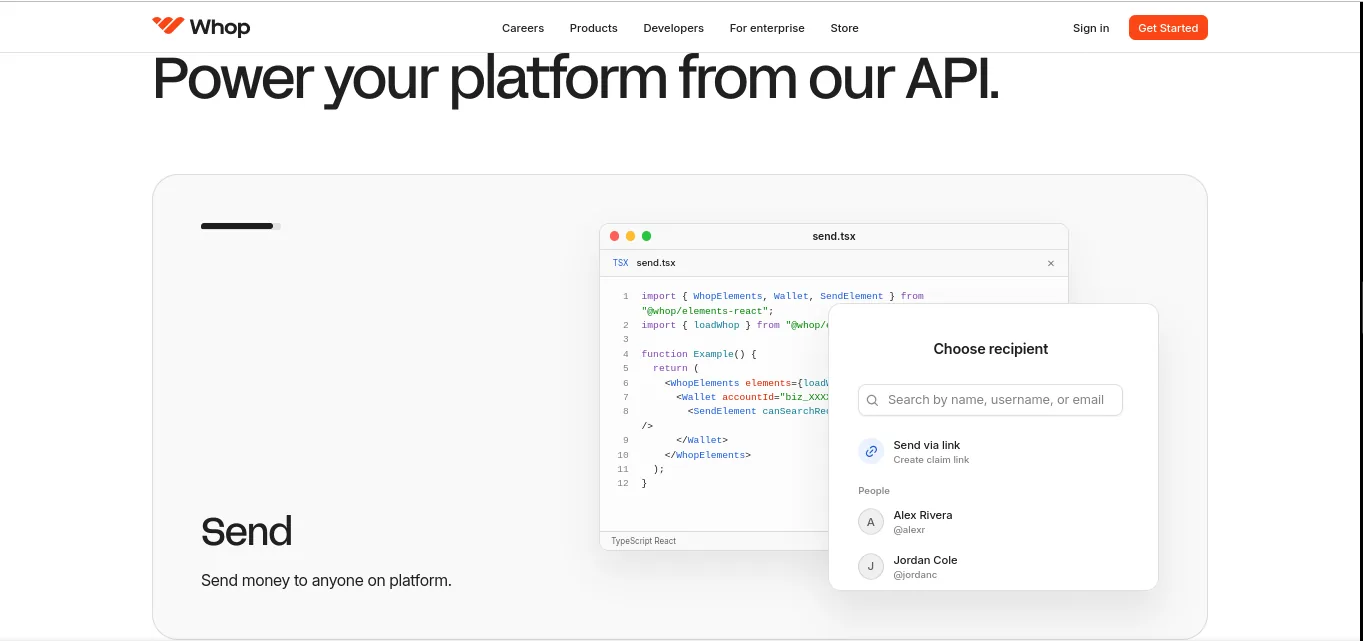
The Whop CLI brings business operations into a terminal and AI-agent workflow. Whop describes it as a way to run dashboard actions programmatically; the live CLI interface shows commands for setting up the business context, deploying hosted web apps, and managing commerce objects such as products, variants, promo codes, memberships and waitlist entries. The exact command set evolves, so treat the CLI overview and command help as the source of truth.
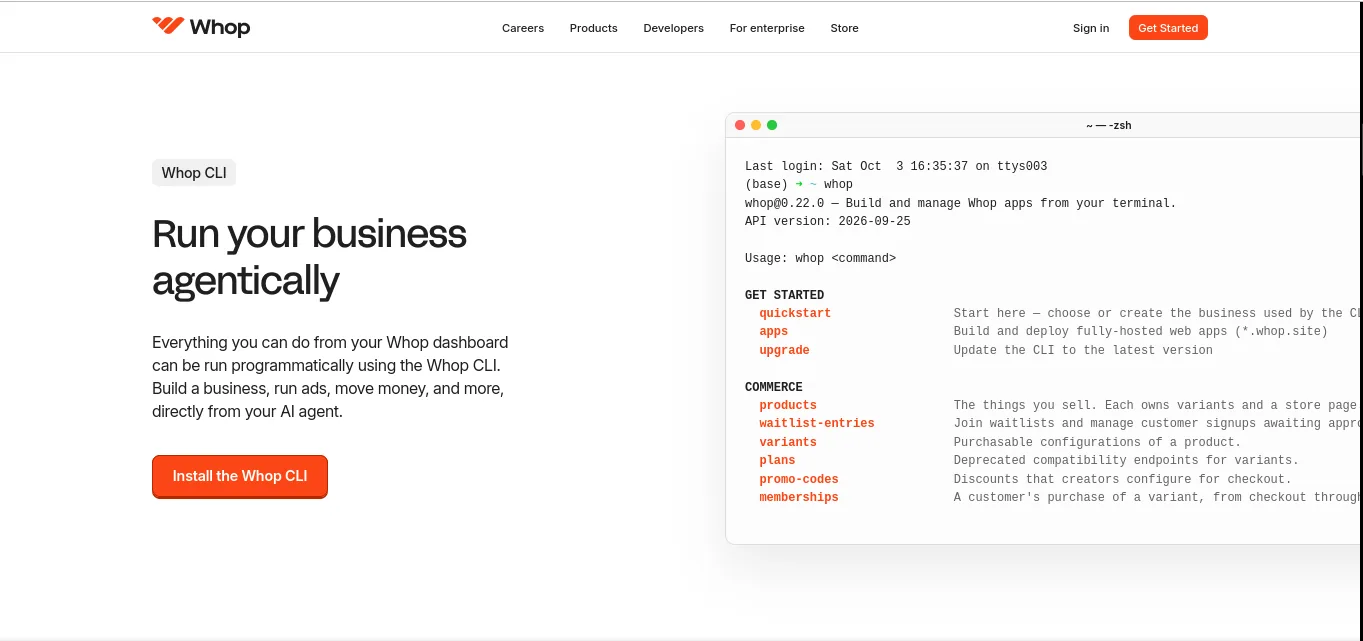
Use the documented endpoints for platform operations and connect events to your own product logic. Plan for credentials, permission scope, webhooks, retries and reconciliation.
Embed supported checkout and platform UI components in a React application; evaluate component coverage, styling and supported environments before committing to the UX.
Run supported Whop operations from a terminal, including app deployment and commerce management. Review generated changes before allowing an agent to affect a live business.
Who should use it? SaaS companies, marketplaces, creator platforms and engineering teams embedding commerce or automating operations. A small creator who only needs to sell one membership can likely start in the dashboard; API and CLI use adds setup, testing, access-control and maintenance work.
Start with the official Whop developer docs, review the CLI overview, then test in an appropriate development context. Confirm API availability, onboarding, commercial terms, supported countries and payment responsibilities with Whop before designing a production integration around them.
Whop Payments Network: enterprise payments and distribution
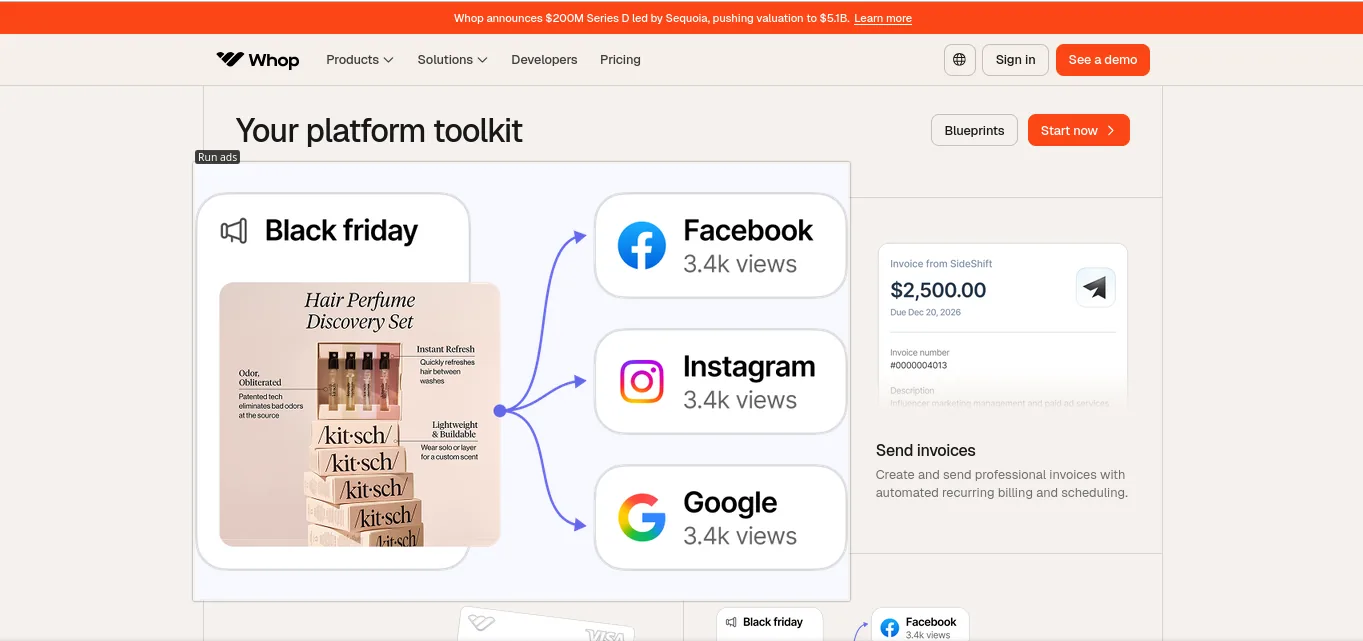
Whop Network is positioned as a commerce and payments stack for businesses that need to serve customers or pay users through their own platform. Its public site presents four connected jobs: accept payments through checkout links or embedded checkout and local payment methods; pay out users through its wallet/payout layer; send invoices; and grow distribution through marketplace listings, affiliates and Whop Ads. The developer API and Elements can connect selected parts of this stack to a company’s product.
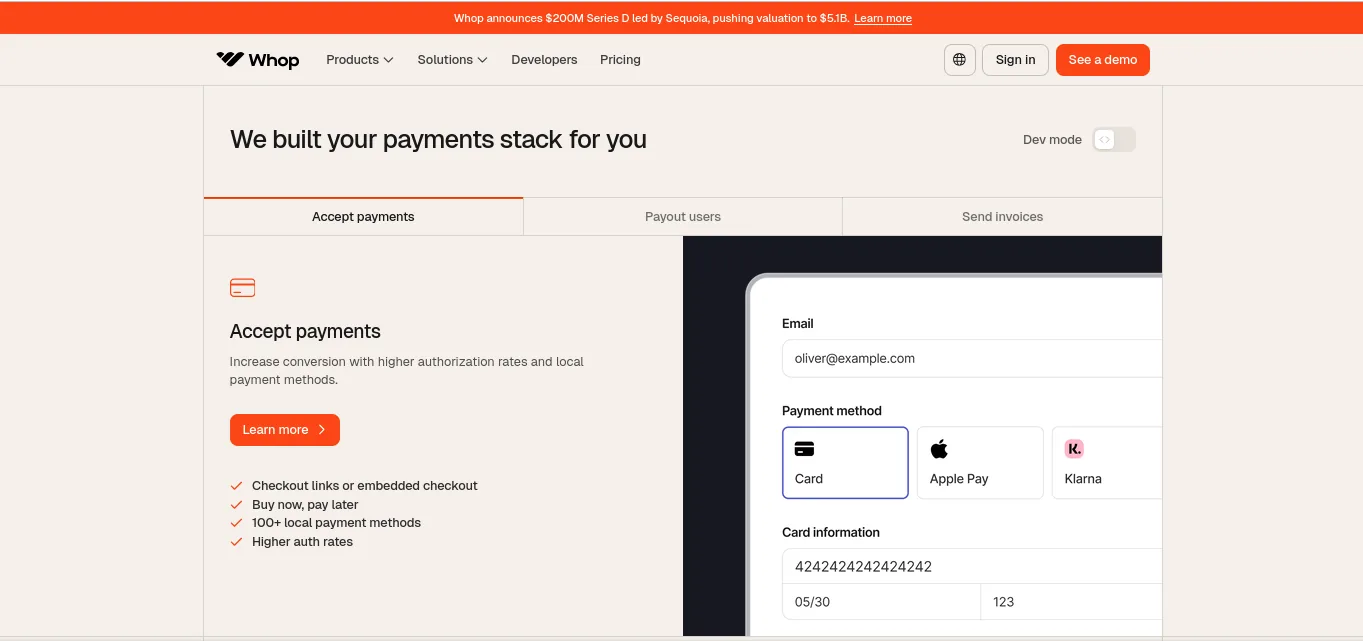
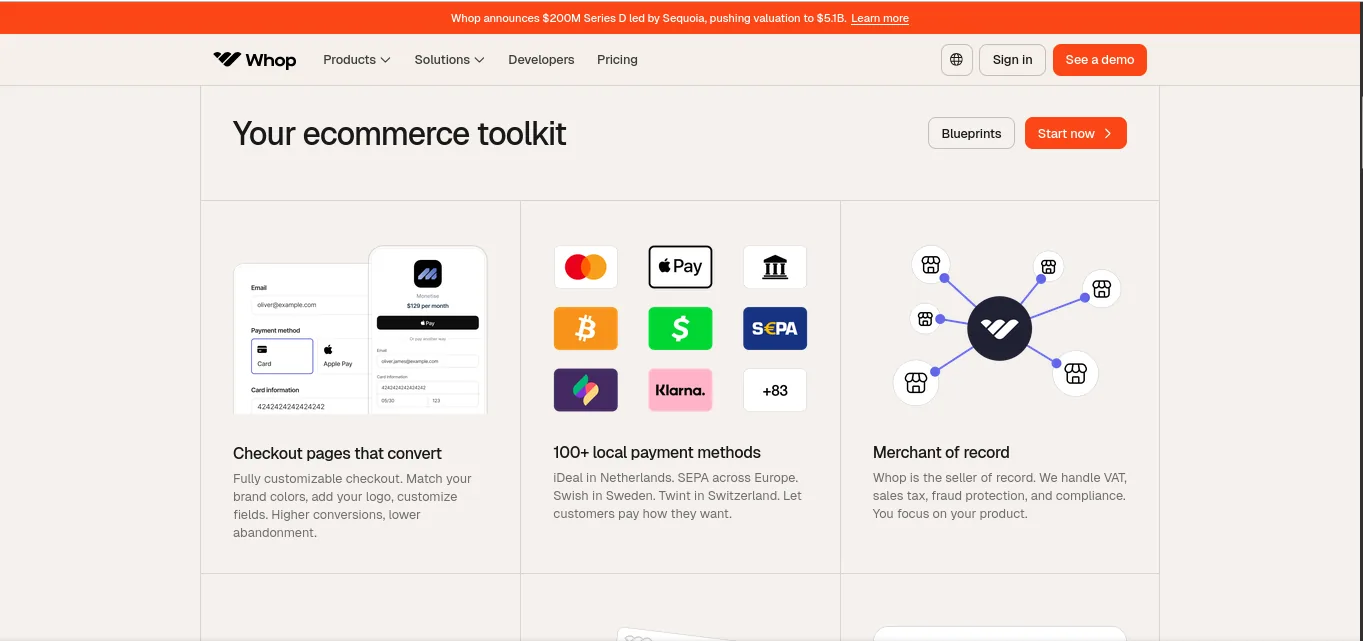
Checkout links or embedded checkout, local payment methods, and buy-now-pay-later options are shown as ways to accept payments. Whop says its network routes payments across providers; validate country and product coverage.
Network navigation includes wallet and invoice flows for paying users and billing customers. Compare payout rails, identity checks, timelines, limits and fees for your use case.
Businesses can list products on Whop’s marketplace and use affiliates or ads as additional distribution channels. Discovery and sales are not guaranteed; retain your own acquisition plan.
Whop lists platform, software, services, coaching and courses, physical products, and event-related solutions. Ask which features, integrations and commercial terms fit your sector.
Enterprise integrations still need onboarding, KYC/underwriting, fraud monitoring, refunds, chargeback operations, reconciliation and customer support ownership.
The Network site offers a demo route alongside a self-service start path. Large platforms should map transaction volumes, geographies, payment mix, payout obligations and migration needs before evaluation.
Whop’s enterprise homepage displays changing scale claims and customer logos. Treat those as company-reported marketing statements, not independent performance guarantees or evidence that a particular integration will fit your business. Request references and service-level details relevant to your expected volume.
See Whop Network, Network pricing and the developer documentation. Public pricing is a useful starting point, but enterprise pricing, eligibility and contractual commitments may depend on the solution and account.
What is Whop like for buyers?
Buyers can browse the marketplace or follow a creator’s direct link, compare a product’s description and plans, check ratings or reviews where available, and complete checkout using the payment methods offered for their country and product. After purchase, access appears through the whop and its installed apps, such as a course, chat, files or external community connection.
The best buyer experience depends heavily on the seller. A marketplace listing is not a platform endorsement or a guarantee that a course, trading group, coaching program or software product will achieve advertised outcomes. Buyers should inspect the seller identity, product details, renewal cadence, cancellation method, refund terms and support expectations. The Buyer Terms state that the applicable total, including fees and taxes, is shown before payment; payment processors may also apply their own currency-conversion or foreign-transaction fees.
Whop pricing and fees: what sellers should budget for
Whop promotes a free-to-start, pay-as-you-go model with no standard monthly platform subscription on its public seller-facing material. The fee a business ultimately pays depends on how it accepts payment and which optional services it uses. The current Whop Payments pricing documentation lists 2.7% + $0.30 per successful domestic card transaction as the base card rate, with an additional 1.5% for international cards and 1% when currency conversion applies. This is a published baseline, not a universal all-in quote for every business or payment path.
| Fee or feature | Published rate | When it may apply |
|---|---|---|
| Domestic card processing | 2.7% + $0.30 | Successful domestic card transaction, baseline rate |
| International card surcharge | +1.5% | When card is international relative to the seller/payment setup |
| Currency conversion | +1% | When conversion applies |
| U.S. ACH debit | 1.5%, capped at $5 | Successful ACH debit payment |
| Financing provider | 15% per successful transaction | Installment purchase through financing partners; terms can vary |
| Tax calculation/collection service | 2% | When optional tax service is enabled and tax is collected |
| Billing automation | 0.5% | When enabled |
| Payment orchestration | 0.8% | When enabled |
| Card dispute | $15 per dispute | When a card dispute occurs; payment rail terms may differ |
| Payouts | Varies | Method-specific: ACH, instant bank, crypto, Venmo, wire or local transfer |
What does the base card fee look like on a sale?
Illustrative cost at Whop’s published 2.7% + $0.30 domestic-card rate, before international, conversion, tax-service, payout, dispute or other applicable fees.
The flat $0.30 component weighs more heavily on low-priced items. These are arithmetic illustrations, not a quote for every payment method.
How the fixed fee changes the effective rate
The same published domestic card price becomes a smaller percentage of the order as the ticket size rises.
Effective rate = (2.7% of order + $0.30) ÷ order value. Rounded to one decimal place.
Example: how optional tools can change a $100 card sale
Illustration using the base fee plus the published optional Billing, Payment Orchestration and Tax Service rates. Each is conditional on the seller’s configuration and transaction eligibility.
Illustrative total: $6.30. This is not a universal fee quote: it assumes all three optional services are selected and applicable, and excludes payouts, disputes, international charges, currency conversion, refunds and taxes owed.
Whop’s pricing documentation separately itemizes payout, fraud, dispute, billing, tax and affiliate-related charges. Some capabilities add a percentage fee; some charge per event or withdrawal. Financing can carry a materially higher processing rate than cards. Before launching, model margins on your actual average order value and blend of customer countries and payment methods.
A practical fee calculation should start with gross receipts, then subtract card or alternative-payment fees, optional services, refunds, chargebacks, affiliate commissions, payouts, taxes you owe and any platform-specific charges. If you are comparing processors, compare the same transaction types and include fixed fees, international and currency charges, payout cost, dispute costs and subscription costs—not just the headline percentage.
How to get started with Whop as a seller
- Choose the business model. Decide whether you are selling a community, course, download, software subscription, service, event, physical product or platform payment flow.
- Set up the business profile. Enter accurate business and owner information, choose the operating country and complete any identity, business or payment verification Whop and its financial partners request.
- Create the product and plan. Explain the offer, set the billing cadence, price, access duration, trial, stock or waitlist as appropriate, and state exactly what the customer receives.
- Add delivery apps. Install only the components necessary to provide the promised experience—such as Courses, Chat, Files, Events, Calls or an external-community connection.
- Build the public product page. Add clear product details, proof you are entitled to use, pricing options, a cancellation/refund policy, support information and FAQs.
- Configure payment and tax settings. Review payment methods, currency, tax mode, payout destination, any optional billing or optimization feature, and fee implications.
- Test the buyer journey. Preview plan selection, checkout, receipts, access provisioning, renewal notices, cancellation, refund handling and customer support using a test or low-risk flow.
- Launch and monitor. Track net revenue, refunds, disputes, failed payments, plan changes and retention. Start promotions with a capped budget and verify that claims and affiliate activity comply with platform rules.
For an API or embedded-payments build, add a separate technical launch plan: sandbox or test-mode validation, webhook retries, idempotency, permission review, failure states, reconciliation, support ownership and a rollback path.
Trust, security, refunds and compliance
Whop publishes terms and support documentation for buyers, sellers, payouts, advertising and prohibited products. Payment infrastructure includes fraud and dispute tools, but risk control is shared. Sellers must represent offers accurately, deliver what was promised, retain evidence of fulfilment, respond to customer issues and follow payment-network and Whop rules.
Whop’s Seller Terms say funds can be reserved or held, payment access suspended or an account terminated based on factors such as new-account status, unusual activity, elevated disputes or compliance concerns. Payout terms also describe holds, delays, reversals and recovery of funds. This is common risk-management language in payments infrastructure; it means new sellers should not build their cash-flow plan around every balance being instantly withdrawable.
Refund responsibility is also important. Sellers generally control refund decisions for product/service issues and are responsible for disputes, returns and chargebacks; Whop may process a refund in specified circumstances, such as a payment-layer issue or legal/card-network requirement. Read the current Seller Terms, Buyer Terms, Terms of Service and Payout Terms, especially if payment holds or chargebacks would threaten your cash flow.
Storefronts, SEO and customer acquisition
Whop public pages can give sellers a shareable destination and support marketplace discovery. That is useful for a new offer because a seller need not build a checkout system from scratch. However, a Whop page is not the same as owning a complete content-marketing website. Sellers who need full editorial control, a large search-focused content library, complex landing-page experimentation or a branded domain architecture may still want a separate website with Whop checkout embedded or linked.
Use a strong product name, an accurate title and description, clear benefit statements, accessible images and an FAQ that answers real buyer questions. Avoid keyword-stuffed promises and fake urgency. Add internal links from your main website, use consistent campaign tagging and ask satisfied customers for honest feedback in ways allowed by platform rules. Whop marketplace traffic can be an additional discovery source, but no platform can promise meaningful visibility or sales from listing alone.
Growth options include referrals and affiliates, Whop Ads, external social and email campaigns, partnerships and content-reward programs. Measure each by net contribution after acquisition cost, refunds, processing fees, affiliate commissions and retention—not gross sales alone. For recurring communities, measure member engagement and renewal, not just the number of initial sign-ups.
Whop pros and cons
What Whop does well
Pros- Connected selling flowBring offer pages, payment and delivery apps together.
- Flexible digital formatsSupport communities, courses, files, services and software access.
- Modular experiencesAdd apps around the way members use the product.
- Global payment reachBroad payment and currency support, subject to availability.
- Growth tools includedAffiliates, ads, discovery and rewards add acquisition options.
- Low barrier to tryPublic pay-as-you-go pricing has no standard monthly seller fee.
What to weigh first
Cons- Fees can stackCross-border, conversion, payouts, disputes and optional tools add cost.
- Seller still owns the offerProduct quality, customer support, refunds and legal duties remain yours.
- Wide scope to learnMany routes and apps mean more settings and policy details.
- Discovery isn’t guaranteedMarketplace presence does not replace product validation or marketing.
- Platform dependenceCheckout, access and member delivery rely on Whop and integrations.
- Not every commerce stackComplex shipping, inventory, CRM or LMS needs may require specialist tools.
Who should use Whop—and who should consider another setup?
| Your business need | Whop fit | What to validate |
|---|---|---|
| Paid creator community with content and chat | Strong | Community apps, moderation, member access and renewal experience |
| Course plus membership or coaching | Strong | Course authoring depth, student progress needs, calls/scheduling and email workflows |
| Digital downloads, templates or paid resources | Good | Delivery controls, download protection, refund handling and average order value |
| Software subscription or gated tool | Good, subject to integration | License/access logic, API scope, failed-payment behavior and support ownership |
| Agency, coaching or appointment service | Potentially strong | Invoices, calendar, client records, service fulfilment and local tax setup |
| High-volume physical commerce with complex logistics | Validate carefully | Inventory, variants, shipping, returns, fulfilment and existing Shopify workflow |
| Content-first publisher needing a full SEO website | Use alongside a website | Blog/CMS control, custom domain, structured data, page speed and content portability |
| Payments product or multi-sided platform | Potentially strong, technical | API pricing, onboarding, compliance model, data flows and implementation support |
Whop is worth a close look if your offer depends on ongoing access, community or digital delivery and you want checkout, entitlements and promotion tools close together. If you already have an audience and need a faster way to package and charge for expertise, the unified model can remove a lot of setup work.
Compare alternatives when your business needs a highly customized self-hosted store, deeply configurable LMS, extensive content SEO, complex physical fulfilment, full CRM automation or absolute control over payment routing and customer data. In those cases, compare the cost and maintenance burden of a specialist stack with the convenience Whop brings.
Frequently asked questions about Whop
Is Whop legitimate?
Whop is an operating commerce and payments platform with published terms, pricing documentation, seller tools and payment partners. That does not mean every listing or seller is endorsed or risk-free. Buyers should evaluate the individual product and seller; sellers should review account eligibility, terms, fees and payout conditions.
Is Whop free to use?
Creating a seller presence is promoted as free to start with no standard monthly subscription on the public pay-as-you-go offer. Transactions, payout methods and optional features can incur fees. Buyers may see applicable transaction fees and taxes at checkout.
What can I sell on Whop?
Whop supports many digital products and services, including memberships, communities, courses, files, software access, coaching, events and services. Whop also describes support for physical-product workflows. All products must comply with current platform and payment rules.
Does Whop take a percentage of every sale?
Whop’s published domestic-card baseline is 2.7% plus $0.30 per successful transaction. Additional costs may apply for international cards, currency conversion, alternative payment methods, tax tools, billing automation, financing, payouts, disputes and other services. Confirm the fee schedule for your exact account and payment method.
Does Whop handle sales tax or VAT?
Whop offers optional tax modes and, where enabled and supported, can calculate or collect and remit certain transaction taxes. Seller responsibility varies by mode and jurisdiction, and sellers remain responsible for accurate settings and other tax obligations. The Tax Service has a listed fee when used.
Can I use Whop on my own website?
Yes. Whop supports payment and checkout tools that sellers can link from or embed in an external website. The developer docs include affiliate attribution guidance for embedded checkout. A custom domain and a separate marketing site can coexist with Whop’s checkout layer.
Does Whop have an affiliate program?
Whop provides seller affiliate tools for tracking referrals and commissions. Sellers set commission rules and should publish clear terms, approved claims, disclosure requirements and refund/reversal policies for partners.
How quickly does Whop pay sellers?
Payout options and estimated timing vary by country, account, method and risk review. Whop lists next-day ACH, instant bank transfer for supported accounts and other payout options, but settlement and withdrawal are not guaranteed to be immediate. Payout fees and holds can apply.
Does Whop guarantee customers from its marketplace?
No. Marketplace discovery can provide another source of exposure, but sellers still need a compelling product, strong listing, customer support and active promotion. Visibility and conversion are not guaranteed.
Can I create a course on Whop?
Yes. The Courses app is designed to organize lessons and learning materials, with multimedia and assessment features described in Whop’s courses documentation. Check the current app capabilities if you need advanced LMS features such as certificates, detailed learning paths or institutional reporting.
Can I use Whop to sell physical products?
Whop’s current product material describes physical-product sales and a Shopify fulfillment connection. Sellers with complex catalog, inventory, shipping or returns needs should validate the workflow before moving their store.
Is Whop a good alternative to Shopify, Patreon or a course platform?
It can overlap with parts of each category, but the right choice depends on your product. Whop is particularly centered on digital memberships, communities, apps and payments. A dedicated commerce platform, membership service or LMS may be a better fit for specialized inventory, patron subscriptions or advanced course administration. Compare exact workflows and total fees, not category labels alone.
Final verdict: is Whop worth using?
Whop is a broad commerce platform built around the idea that a business can sell, deliver, manage access and grow from one connected home. Its most persuasive advantage is the combination: storefront and checkout, modular community or course apps, subscriptions, payment options, affiliates, ads and payout tools all sit in one ecosystem. For a digital-first business, that can reduce the number of systems that must be stitched together.
The features and fee schedule deserve a careful read before migration. Transaction costs extend beyond a headline card rate; marketplace discovery is not guaranteed; seller responsibilities remain substantial; and the more you use tax, billing, payout, financing or advertising features, the more you need to understand the related charges and terms. I would shortlist Whop for communities, courses, digital products, software access and service businesses that want integrated monetization. I would test the exact buyer journey and fee math before making it the backbone of a high-volume or highly regulated operation.
If the platform fits your model, start by reviewing the current product and pricing information directly on Whop’s website, then create a small test offer and validate checkout, delivery, cancellation and support before scaling.
Sources checked and review notes
This review was prepared November 11, 2026 from publicly available product and policy information. Official fees, supported methods, products and legal terms change; verify current documents for your country and account before relying on a rate or feature.
- Whop product homepage
- Whop Payments Network pricing and Payment Processing and Payout Fees docs
- Paid groups and community tools
- Whop Courses app guide and Whop App Store overview
- Whop consumer, seller and platform guide
- Seller Terms, Buyer Terms, Terms of Service and Payout Terms
- Whop Ads and Ads Terms