What Is a Browser Profile and How Does It Work?
Your Profile Is the Folder That Knows Everything About You
Every time you open Chrome, Firefox, Edge, or Safari, you are loading a specific folder on your hard drive that holds your identity. That folder is your browser profile, and it is the single most important concept to understand if you care about multi-account management, privacy, affiliate work, ad buying, or getting flagged by platforms. It stores everything that makes you you to the websites you visit — cookies, logins, extensions, history, bookmarks, and the fingerprint the browser reports about your device. This guide explains exactly what a profile is, what is inside it, why it matters for multi-accounting, and how anti-detect browsers like Incogniton turn a profile into a fully isolated digital identity.
Quick answer
What is a browser profile?
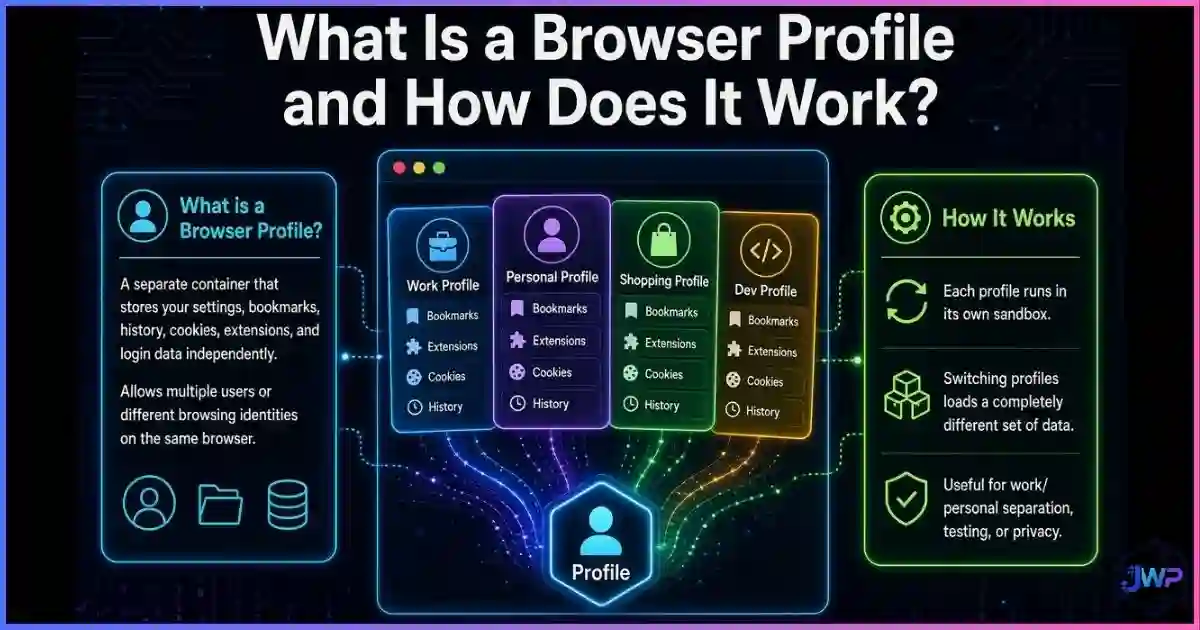
A browser profile is a folder on your computer that stores everything your browser needs to be “you.” It contains your cookies, saved logins, browsing history, bookmarks, installed extensions, local storage, service workers, and the settings that determine what the browser reports to websites (your language, timezone, screen size, fonts, and more).
When you create a new profile in Chrome or Firefox, the browser makes a new folder and treats the session as a different user. When you manage multiple accounts on the same platform without proper browser profile isolation, every account shares the same profile — and that is exactly how platforms link them and ban them together.
Definition
What a Browser Profile Actually Is
A browser profile is simply a folder on your device that stores all of the browser’s user-specific data. The browser executable itself lives in one place (e.g., C:\Program Files\Google\Chrome or /Applications/Google Chrome.app), and your profile lives in a completely different place (e.g., C:\Users\YourName\AppData\Local\Google\Chrome\User Data\Default on Windows).
When you open Chrome with “Profile 1” and Chrome with “Profile 2,” you are running the same application twice against two different folders. To the websites you visit, those look like two different people — or they would, if the profiles were not sharing the same underlying hardware, operating system, IP address, and fingerprint. That is the whole reason anti-detect browsers exist: they let each profile pretend to be a different machine entirely.
├── Default/ ← Profile 1 (your main account)
│ ├── Cookies SQLite DB of all your cookies
│ ├── Login Data Saved passwords, encrypted
│ ├── History Browsing history DB
│ ├── Web Data Autofill info
│ ├── Preferences Settings, flags, feature toggles
│ ├── Local State Session state
│ ├── Extension* Installed extensions & their data
│ ├── Local Storage/ Per-site localStorage
│ ├── Cache/ Downloaded assets
│ └── IndexedDB/ Per-site IndexedDB data
├── Profile 1/ ← A second Chrome profile
└── Profile 2/ ← A third Chrome profile
Every Chromium-based browser (Chrome, Edge, Brave, Opera, Vivaldi) uses roughly the same folder structure. Firefox uses a similar Profiles/ folder with cookies.sqlite, logins.json, places.sqlite, and prefs.js. Safari keeps profiles under ~/Library/Safari/. The concept is identical: one folder = one user identity.
Anatomy
The Anatomy of a Browser Profile
A profile is not one thing; it is a collection of data stores that together form the browser’s memory of you. Each one plays a role in how websites recognize you:
🍪 Cookies
Session IDs, authentication tokens, and tracking identifiers. The most visible piece of your online identity. See browser cookies explained.
🔐 Login Data
Encrypted saved passwords, auto-fill usernames, and form data. Lets you log in to accounts without typing credentials.
📜 History
Every URL you have visited, with timestamps. Used for autocomplete, address bar suggestions, and “frequently visited” tiles.
📦 Extensions
Installed add-ons, their settings, and any data they store locally. A major fingerprinting vector.
💾 Local Storage
Persistent key/value storage per site. Outlives cookies in many cases and is commonly used for cross-session tracking.
⚙️ Preferences
Your settings, theme, default search engine, language, timezone, and feature flags. Shapes how the browser reports itself to sites.
🖼️ Cache
Downloaded images, scripts, and fonts. Can be fingerprinted through cache timing and e-tag behavior.
📚 IndexedDB
Larger structured storage per site. Used by SPAs, analytics, and sometimes by trackers as a cookie backup.
🎯 Fingerprint
The browser-reported hardware, fonts, screen size, WebGL, canvas hash, audio context, and timezone that sites read to identify your device. See what browser fingerprinting is.
| Profile component | Shared between Chrome profiles? | Shared between separate browsers? |
|---|---|---|
| Cookies | ✕ Isolated per profile | ✕ Isolated per browser |
| History & bookmarks | ✕ Isolated per profile | ✕ Isolated per browser |
| Saved logins | ✕ Isolated per profile | ✕ Isolated per browser |
| Installed extensions | ✕ Isolated per profile | ✕ Isolated per browser |
| Local storage / IndexedDB | ✕ Isolated per profile | ✕ Isolated per browser |
| Browser fingerprint | ✓ Same hardware & engine | ~ Mostly same (different engine) |
| IP address | ✓ Same connection | ✓ Same connection |
| User-Agent / engine | ✓ Same version | ~ Different if different browser |
| Timezone, language, screen | ✓ From the OS | ✓ From the OS |
The critical takeaway: Chrome profiles isolate cookies, history, logins, and storage — but they do not isolate your fingerprint, your IP, or your hardware signature. That is the gap that anti-detect browsers are designed to close.
Data
Browser Profile & Fingerprint Statistics
The numbers explain why most multi-account setups get flagged. Default browser profiles leak an enormous amount of identifying information, and fingerprint uniqueness is extremely high on the open web:
Fingerprint uniqueness by browser setup
Sources: EFF Panopticlick, INRIA AMIUNIQUE, Cover Your Tracks, Gómez-Boix 2018. Lower is better for identity isolation.
How many platforms the average user manages
Source: GlobalWebIndex via Backlinko, 2024.
With the average user signed into 6+ platforms, and professionals managing 20–50+ accounts for clients, ads, or affiliate work, the “one profile per identity” requirement is not optional — it’s a compliance problem.
- Marketers run 10–100+ ad accounts per client
- Affiliate teams manage dozens of social and marketplace profiles
- QA testers need separate identities for each test case
Mechanics
How a Profile Actually Loads and Operates
When you click the Chrome icon, the browser performs a predictable sequence:
It picks a profile folder
Based on the --profile-directory flag (or the profile picker UI), Chrome points to one of the folders inside User Data/. That folder becomes the session’s state.
It loads databases into memory
The Cookies, History, Login Data, and Web Data SQLite databases are opened. Your extensions are loaded from their subfolders. Preferences are read from Preferences and Local State.
It builds the fingerprint from the OS
Your screen size, installed fonts, GPU, timezone, language, and user agent are collected from the operating system and browser engine. This fingerprint is identical across every profile running on the same machine.
It opens the network connection
Your IP address is determined by your router / ISP / VPN. This is also identical across every Chrome profile on the machine.
You visit a site
The site reads the fingerprint, receives the IP, stores a cookie in this profile’s Cookies database, and writes any localStorage in this profile’s Local Storage/. Next time you visit, everything persists.
Closing the browser writes state back to disk
All changes are flushed to the profile folder. The folder becomes the long-term memory of that identity.
This is why “I’ll just log out and log in as a different account” does not actually work for serious multi-accounting. The fingerprint and IP still tie the new login to the old one. Platforms like Facebook, Google, Amazon, and TikTok use exactly this pattern to flag accounts as linked — and to ban them together.
Why It Matters
Why Browser Profile Isolation Matters
If you run multiple accounts in the same browser profile, you are linking every one of those accounts to the same digital identity. Platforms detect that link through four overlapping signals:
- Shared cookies and localStorage. When you log in to account A and account B in the same profile, both sets of cookies live side by side. A single tracker script reading those cookies can instantly see both.
- Identical browser fingerprint. Canvas hash, WebGL renderer, fonts, screen size, and timezone are identical for every session from that profile. Fraud systems treat that as strong evidence of a single operator.
- Shared IP address. Every request goes out through the same router. A residential IP linked to ten accounts is a clear pattern.
- Behavioral overlap. Browsing history, typing speed, and navigation patterns are shaped by the same person and the same profile.
Proper browser profile isolation breaks every one of those signals. Each profile gets its own cookies, its own storage, its own fingerprint, and (when paired with a dedicated proxy) its own IP address. To a platform, each profile looks like a different person on a different device in a different city. For a deep dive on the full architecture, see anti-detect browser profiles and digital identities.
Default Chrome profiles don’t isolate enough.
Chrome’s built-in profile switcher gives you separate cookies and history — but the fingerprint, timezone, IP, and hardware remain identical. Incogniton gives each profile its own spoofed fingerprint, dedicated proxy, isolated cookies, and persistent storage — the four layers real platforms use to link accounts.
Get Real Profile Isolation with Incogniton → Affiliate link — we may earn a commission at no extra cost to you.Comparison
Profiles vs Separate Browsers vs Virtual Machines
There are three basic ways to run multiple identities, and they sit on a clear trade-off curve: convenience vs isolation. The full breakdown is in our guide on profiles vs separate browsers vs virtual machines, but here is the quick matrix:
| Method | Cookie isolation | Fingerprint isolation | IP isolation | Speed / cost | Best for |
|---|---|---|---|---|---|
| Single browser, one profile | ✕ | ✕ | ✕ | Fast / free | One account per platform |
| Chrome profile switcher | ✓ | ✕ | ✕ | Fast / free | Work vs personal accounts |
| Two separate browsers (Chrome + Firefox) | ✓ | ~ | ✕ | Fast / free | Two distinct identities |
| Container extensions (Firefox Multi-Account) | ~ | ✕ | ✕ | Fast / free | Light personal / work split |
| Anti-detect browser (Incogniton) | ✓ | ✓ | ✓ (with proxy) | Fast / freemium | 2–100+ managed identities |
| Separate VPS per identity | ✓ | ✓ | ✓ | Slow / expensive | Extreme isolation |
| Virtual machines | ✓ | ✓ | ✓ | Slow / heavy | Research, sandboxing |
✓ = isolated ~ = partial ✕ = shared. For most professionals, anti-detect browser + per-profile proxy is the sweet spot: the isolation of a VM with the speed of a normal browser.
Enhanced Profiles
Anti-Detect Browsers & Enhanced Profiles
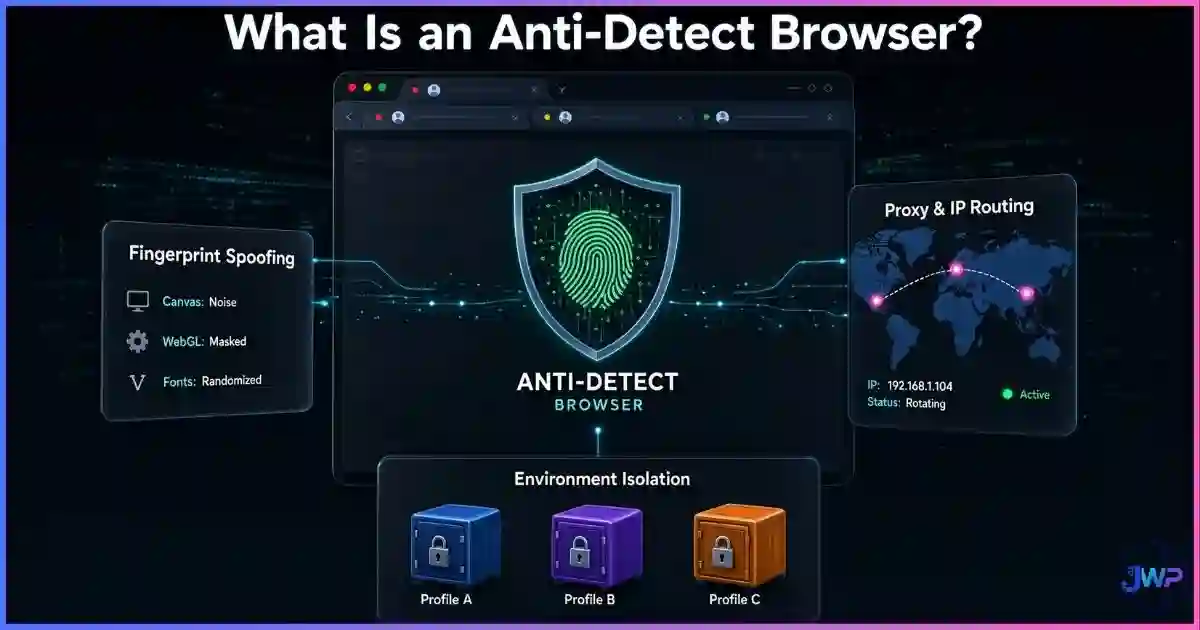
An anti-detect browser is, at its core, a profile manager that lies to websites on your behalf. Instead of reporting your real hardware, OS, and timezone, each profile reports a consistent, believable, and unique spoofed set of values. Incogniton, Multilogin, GoLogin, and AdsPower all work this way — and our best anti-detect browsers guide ranks them by feature set and price.
A well-built anti-detect profile controls:
- Canvas fingerprint — unique, consistent hash per profile
- WebGL renderer & vendor — spoofed GPU information
- AudioContext — unique audio fingerprint per profile
- Fonts, screen size, color depth — matched to the spoofed OS
- Timezone & language — matched to the attached proxy
- WebRTC leak prevention — see what WebRTC is and how it affects privacy
- Isolated cookies, localStorage, IndexedDB — one set per profile
- Dedicated proxy per profile — each identity has its own IP
The consistency rule is critical: a spoofed fingerprint that changes on every page load is instantly flagged as a bot. A spoofed fingerprint that remains stable across sessions looks like a real user. That is why modern anti-detect browsers persist each profile’s fingerprint data back to disk — the profile becomes a durable digital identity, not a one-shot spoof. (And yes, platforms can detect poor-quality spoofing — see can websites detect anti-detect browsers?.)
Each profile. Its own identity. Its own fingerprint. Its own proxy.
Incogniton gives you up to 10 free profiles out of the box, each with consistent spoofed fingerprints, persistent cookies, and proxy support. Ideal for affiliate marketers, ad buyers, e-commerce operators, and agencies managing multiple accounts.
Start Free with Incogniton → Affiliate link — we may earn a commission at no extra cost to you.Use Cases
Real-World Use Cases for Profile Isolation
| Use case | Why isolation matters | Right tool |
|---|---|---|
| Affiliate marketing | Offer networks and ad platforms flag multi-accounting; isolated profiles keep accounts independent. | Anti-detect + residential proxies |
| Ad buying / media buying | Managing client ad accounts in the same profile risks cross-contamination and account bans. | One profile per client ad account |
| E-commerce (Amazon, TikTok Shop, Etsy) | Marketplaces aggressively link and ban stores operated from the same profile. | Anti-detect + per-store proxy |
| Social media management | Agencies manage dozens of client profiles; mixing them in one browser creates audit and ban risk. | Isolated profiles per client |
| QA and automated testing | Tests need clean, repeatable states. Shared profiles bleed state across test runs. | Fresh profile per test suite |
| Web scraping / data collection | One fingerprint hitting a site thousands of times gets blocked fast. Profile rotation spreads load. | See best web scraping providers |
| Personal privacy / work split | Keep work logins and personal browsing in separate cookies without sharing fingerprint. | Chrome profile switcher (light) or anti-detect (heavy) |
| Bonus hunting / arbitrage | Platforms link accounts that share cookies, fingerprint, and IP; isolation is the only defense. | Anti-detect + residential proxy |
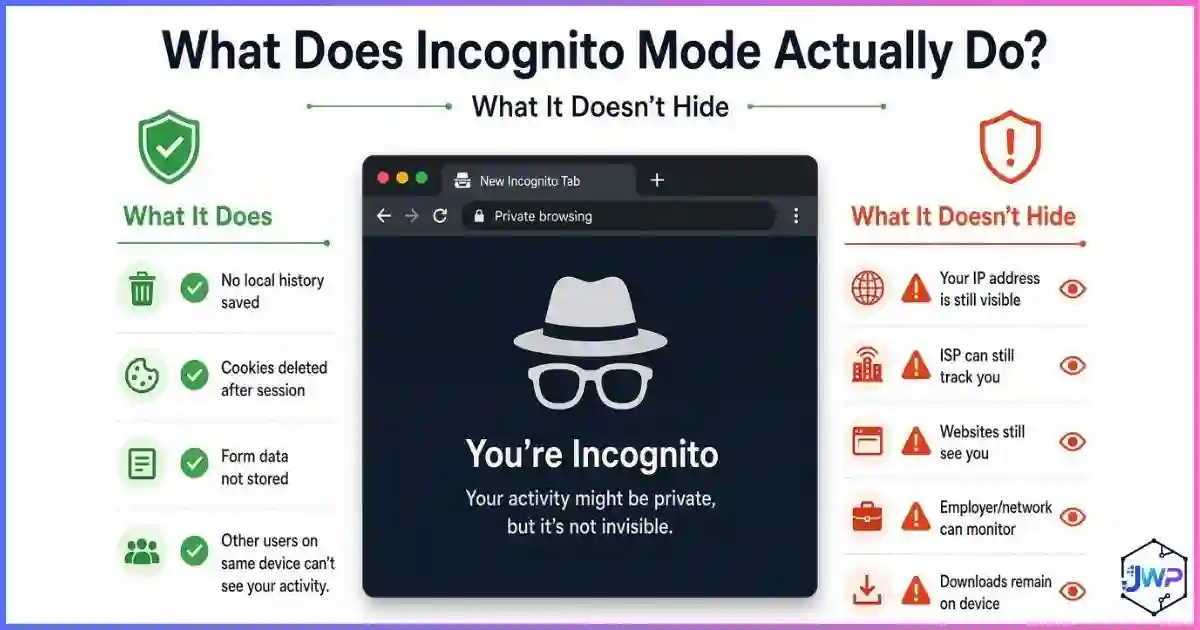
For privacy-focused personal use, compare anti-detect browsers vs incognito mode — they solve very different problems, and the right choice depends on whether you care about hiding history from your roommate (incognito) or hiding identity from websites (anti-detect).
Myth Busting
6 Browser Profile Myths, Busted
Myth 1
“A new Chrome profile is a new identity.”
Reality
It is a new cookie jar. The fingerprint, IP, and hardware signature are still identical to your main profile.
Myth 2
“Clearing cookies resets my profile.”
Reality
Clearing cookies ends logged-in sessions but does not change your fingerprint, browser version, or any stored localStorage or IndexedDB.
Myth 3
“Two different browsers give me two identities.”
Reality
Two browsers help with cookies, but hardware, IP, timezone, fonts, and screen size remain identical across both.
Myth 4
“Incognito mode is a separate profile.”
Reality
Incognito is a temporary profile that is deleted on close. It still shares fingerprint and IP with your main profile. See what incognito actually does.
Myth 5
“VPNs fix the profile problem.”
Reality
A VPN only changes the IP. Cookies, fingerprint, and hardware remain the same, so accounts still link.
Myth 6
“Profiles are only useful for multi-accounting.”
Reality
Profile separation also improves security (quarantine risky sessions), performance (fresh caches), and testing (repeatable state).
Action Plan
How to Use Profiles Correctly
Decide your threat model
If you only need to separate work from personal logins, Chrome’s profile switcher is enough. If you need accounts that cannot be linked to each other, you need full profile isolation with fingerprint spoofing and per-profile proxies.
Name profiles clearly
Use descriptive names: “Client A — Facebook Ads,” “Affiliate — Store 3,” “Personal.” Vague names lead to mistakes.
Assign a dedicated proxy per identity
When using anti-detect browsers, each profile should have its own residential or mobile proxy. Shared proxies defeat the purpose of isolation.
Keep fingerprints stable
Once you create a profile, don’t re-randomize its fingerprint. Stable = human. Changing every session = bot.
Don’t mix identities in the same profile
If you ever log into “identity A” in a profile dedicated to “identity B,” the link is made permanently. Use a different profile or an incognito window for one-off checks.
Audit profiles quarterly
Delete dead profiles, refresh proxies that have leaked, and verify each profile’s fingerprint is still consistent across test sites.
Skip these assumptions
- “A new Chrome profile = a new identity”
- “Clearing cookies = fresh start”
- “Two browsers = two identities”
- “VPN alone protects my accounts”
- “Incognito hides me from websites”
Do this instead
- Isolate cookies + fingerprint + IP together
- Keep fingerprints stable, not random
- One proxy per identity
- Use anti-detect browsers for 3+ accounts
- Name and audit profiles regularly
Profile setup checklist
- Each profile has its own dedicated proxy (residential or mobile).
- Each profile has a stable, believable fingerprint.
- Timezone and language match the proxy’s geography.
- No shared cookies or localStorage between profiles.
- I have never cross-logged identities in the same profile.
- Profiles are named clearly and grouped by client or project.
- Old or dead profiles are archived or deleted.
Stop linking your accounts with your default browser.
Incogniton gives you strict profile isolation out of the box: dedicated fingerprint, isolated cookies, per-profile proxy, and cloud sync across your team. Up to 10 profiles free, then flexible paid tiers.
Try Incogniton Free → Affiliate link — we may earn a commission at no extra cost to you.FAQs
Frequently Asked Questions
What exactly is a browser profile?
Does a new Chrome profile make me anonymous?
Can websites tell I am using multiple profiles?
What is the difference between a profile and a browser?
Are Chrome profiles enough for multi-accounting?
What is an anti-detect browser profile?
Do profiles affect browser performance?
📚 Sources & Research Notes (click to expand)
This guide draws on browser fingerprinting research, browser market data, and multi-account management best practices. Browser architectures and platform detection methods evolve; verify current vendor documentation before making decisions based on this article.
- Eckersley, P. (2010). “How Unique Is Your Web Browser?” EFF Panopticlick — foundational finding that 83.6% of browsers have unique fingerprints. panopticlick.org
- Gómez-Boix, A., et al. (2018). “An Analysis of the Effectiveness of Browser Fingerprinting.” ACM CCS — 73% uniqueness on mobile devices, ~35% on desktops with some defenses. dl.acm.org
- Laperdrix, P., et al. (2020). “Fingerprinting the Fingerprinters.” INRIA AMIUNIQUE project — ongoing measurements of browser fingerprint diversity. amiunique.org
- StatCounter (July 2025–July 2026). Browser market share worldwide — Chrome 68.28%, Safari 16.47%, Edge 5.36%. gs.statcounter.com
- DemandSage / Cropink (2026). Chrome usage statistics — ~3.62 billion Chrome users globally. demandsage.com
- GlobalWebIndex / Backlinko (2024). Social media usage research — average user accesses 6.52 platforms per month. backlinko.com
- Google Chrome documentation — View Chrome browser profile details.
- Mozilla Support — Firefox Profiles — architecture of Firefox’s profile storage.
- Apple Developer Documentation — Safari profile and data storage locations.
Browser architectures, platform detection rules, and fingerprinting techniques evolve quickly. Always verify current documentation from Chrome, Firefox, Safari, Edge, and your chosen anti-detect browser vendor before making multi-account decisions.