Apify Review: Pricing, Actors, Features & Real Costs

Apify is a cloud platform for running web-data and automation programs called Actors. You can choose a ready-made Actor from a Store currently presented as having 69,000+ tools, build your own in JavaScript or Python, schedule it, connect proxies, store results, and retrieve data through an API.
That breadth is Apify’s strength and the main reason its pricing needs careful explanation. A subscription provides prepaid platform usage, but an Actor may charge per event or only for the resources it consumes. Compute, proxies, storage operations, transfer, and overages can all affect the invoice. This review maps those layers so the low-friction free plan does not create a false impression of one universal price.
Table of contents
Apify at a glance
| Area | What Apify provides | Review takeaway |
|---|---|---|
| Ready-made tools | Public Store of Apify- and community-built Actors | Quality, maintenance, input schema, and price are Actor-specific. |
| Custom development | Actor development with JavaScript or Python, SDKs, templates, builds, and versions | Flexible for developers, but custom maintenance remains your responsibility. |
| Execution | Cloud runs, tasks, schedules, webhooks, API control, logs, memory settings | Useful for production workflows once retries and spend limits are configured. |
| Network access | Datacenter, residential, SERP, and Unblocker options | Proxy charges are separate platform resources unless Actor pricing says otherwise. |
| Storage | Datasets, key-value stores, request queues, API access and exports | Storage and post-run reads/writes can be billable. |
| Support | Community, chat, priority chat, account manager by plan | Select by required support channel as well as resource price. |
What are Apify Actors?
An Actor is a cloud program packaged to accept structured input, run a job, and return data or perform an automation. Some Actors crawl a specific website; others are general browser, HTTP, AI, transformation, or integration tools. You can run an Actor manually, through a saved task, on a schedule, from another Actor, via webhook, or through the API.
The Store removes much of the initial engineering when a maintained Actor already matches the target. It does not eliminate due diligence. Community developers control their own code and pricing, and a site change can affect a scraper. Review the maintainer, update history, input/output schema, issue handling, pricing section, and sample run before treating a Store listing as production infrastructure.
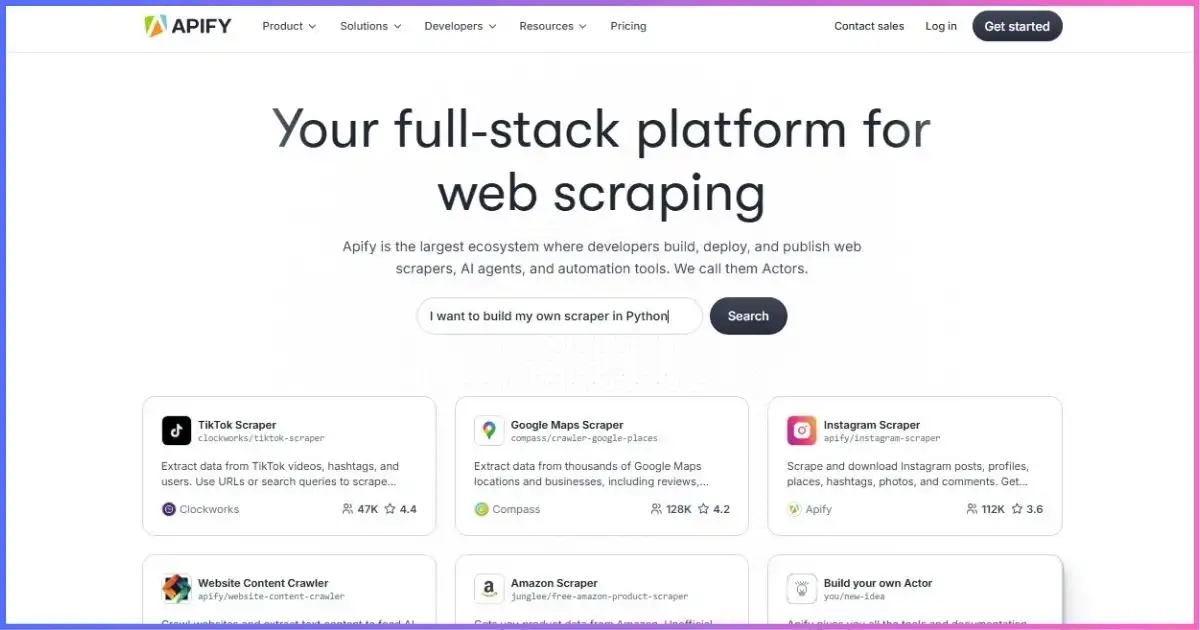
Archived provider screenshot from the supplied image list. Current pricing and capabilities are described from official pages checked for this review.
Pay per event
The Actor developer defines billable events such as starting a run or returning a result. Most include platform usage in the event price, but some charge platform resources separately. Read the Actor’s pricing section.
Pay per usage
No separate developer fee is charged; you pay for consumed platform resources such as compute units, proxies, transfer, storage, and operations.
Rental transition
Apify is retiring fixed monthly Actor rentals on October 1, 2026. Remaining rental Actors are scheduled to move to usage-oriented pricing, so do not copy an old rental price into a forecast.
Build your own
Custom Actors offer full control over code and output, but costs still include the platform resources used. The public pricing page also advertises a separate Creator offer with conditions that should be checked.
Apify features and workflow components
| Component | Purpose | Practical detail |
|---|---|---|
| Actors | Package code, dependencies, input schema, execution and output | Use an existing Store Actor or build with JavaScript/Python. |
| Tasks | Save an Actor plus reusable input and options | Useful for repeatable non-developer operations. |
| Schedules | Run Actors or tasks on a timetable | Track overlap, concurrency and spending if jobs run longer than expected. |
| Webhooks | React to run success, failure and other events | Use scoped credentials carefully and verify downstream retries. |
| Datasets | Store structured results with table view and exports | Exports may include JSON, CSV, Excel and other formats. |
| Key-value stores | Store arbitrary JSON, HTML, images, strings and run state | Useful for inputs, screenshots and crawl snapshots. |
| Request queues | Coordinate URL processing and deduplication | Support breadth-first and depth-first crawling patterns. |
| Proxy / Unblocker | Route requests and handle difficult access patterns | Price and availability vary by plan and proxy type. |
| Integrations | Connect data and events to other systems | REST API, webhooks, Google Drive, Airtable, Snowflake and more are documented. |
For developers, the platform’s API and SDKs are the connective tissue. A typical run receives input from a key-value store, takes URLs from a request queue, writes records to a dataset, and signals completion through a webhook. The MDN Fetch API guide is a useful neutral reference for the request/response foundation beneath many custom HTTP workflows.
Apify pricing plans
Apify uses a prepaid-usage model. Each subscription price is also the included platform credit for that billing period: $5 on Free, $19 on Starter, $199 on Scale, and $999 on Business. Paid plans continue into pay-as-you-go overage when enabled within billing limits. Free usage stops when the $5 credit is exhausted. Monthly credits expire; they do not roll into the next monthly period.
| Plan | Monthly price / prepaid usage | CU price | Actor RAM | Concurrent runs | Support |
|---|---|---|---|---|---|
| Free | $0 / $5 | $0.20 | 16 GB | 5 | Community |
| Starter | $19 / $19 | $0.20 | 64 GB | 32 | Chat |
| Scale | $199 / $199 | $0.16 | 256 GB | 128 | Priority chat |
| Business | $999 / $999 | $0.13 | 512 GB | 256 | Account manager |
| Enterprise | Custom | Custom | Custom | Custom | Custom / SLA scope |
Compute-unit price by plan
One compute unit is 1 GB of RAM for one hour. Common scale: $0 to $0.20 per CU.
Included maximum concurrent runs
Plan limit, not guaranteed workload throughput. Each Actor can have its own behavior and resource needs.
Proxy and managed-access rates
| Resource | Free | Starter | Scale | Business |
|---|---|---|---|---|
| Residential proxy | $8/GB | $8/GB | $7.50/GB | $7/GB |
| Datacenter IPs | 5 included | 30 included, then $1/IP | 200 included, then $0.80/IP | 500 included, then $0.60/IP |
| Google SERP proxy | $2.50/1,000 | $2.50/1,000 | $2/1,000 | $1.70/1,000 |
| Unblocker | $1.50/1,000 requests | $1.50/1,000 | $1.25/1,000 | $1/1,000 |
Selected storage and transfer prices
| Resource | Free / Starter | Scale | Business |
|---|---|---|---|
| Dataset timed storage / 1,000 GB-hours | $1.00 | $0.90 | $0.80 |
| Dataset 1,000 reads | $0.0004 | $0.00036 | $0.00032 |
| Dataset 1,000 writes | $0.005 | $0.0045 | $0.004 |
| Request queue timed storage / 1,000 GB-hours | $4.00 | $3.60 | $3.20 |
| External data transfer / GB | $0.20 | $0.19 | $0.18 |
| Internal data transfer / GB | $0.05 | $0.045 | $0.04 |
How Actor pricing actually works
Two Actors performing similar tasks can have different billing logic. The platform pricing page describes pay-per-event and pay-per-usage models, and Apify documentation still records rental Actors during the scheduled retirement period. Always inspect the Actor’s own Pricing tab.
| Model | What you pay | Cost risk | Best estimation method |
|---|---|---|---|
| Pay per event | Defined events such as run start, page, item or result | Platform resources are usually included, but some Actors add them separately. | Read the event table and run a capped sample. |
| Pay per usage | Compute, proxies, transfer, storage and operations consumed | Dynamic pages, retries, memory, browser use and large outputs can increase cost. | Inspect itemized usage from a representative run. |
| Rental during transition | Legacy monthly Actor fee plus platform use | Scheduled retirement means the pricing model can change. | Check the current Actor page; do not use an archived rental price. |
Store discounts are shown by subscription tier rather than one universal percentage: Starter receives Bronze, Scale Silver, and Business Gold treatment where applicable. The exact Actor price and discount belong to that Actor’s live pricing page.
Estimating the real cost of Apify
For pay-per-usage Actors, compute is memory multiplied by run duration. A run using 2 GB for 30 minutes consumes 1 CU. At $0.20/CU that compute portion is $0.20; at $0.16 it is $0.16. Add residential traffic, external transfer, storage, and operations. For pay-per-event Actors, begin with event charges and add platform use only if the Actor says it is separate.
Identify pay-per-event, pay-per-usage, or remaining rental terms.
Add compute, proxies, transfer, storage, reads and writes when applicable.
Divide total spend by validated records, not requests attempted.
| Illustrative component | Assumption | Starter-rate result |
|---|---|---|
| Compute | 2 GB RAM × 0.5 hour = 1 CU | 1 × $0.20 = $0.20 |
| Residential proxy | 0.25 GB transferred | 0.25 × $8 = $2.00 |
| External transfer | 0.10 GB exported | 0.10 × $0.20 = $0.02 |
| Dataset operations | 10,000 writes | 10 × $0.005 = $0.05 |
| Illustrative platform total | Before any separate Actor event fee | $2.27 |
This example is arithmetic, not an Apify quote or benchmark. A real run can use different memory, time, traffic, storage, event charges, retries, and discounts. The lesson is that a cheap CU does not make proxy-heavy scraping cheap, and a low event rate can still become costly if it bills every returned item.
A practical Apify evaluation workflow
- Define the permitted target and output. Write down required fields, refresh schedule, geography, acceptable error rate, retention and deletion rules.
- Compare Actors, not only names. Check the developer, maintenance history, issues, input schema, output sample, pricing model and whether platform use is included.
- Cap a small run. Limit pages, items, depth, duration, memory and retries. Use the free credit only for representative testing.
- Validate output. Measure complete, schema-valid, deduplicated records. A run marked “succeeded” does not guarantee useful data.
- Inspect billing. Record event charges, CUs, proxy GB, transfer, storage, and operations. Forecast from actual consumption.
- Secure integrations. Use the narrowest practical token access, rotate credentials, and avoid exposing secrets in Actor input or logs.
- Add schedules and webhooks. Prevent overlapping jobs, handle duplicate delivery, and make downstream processing idempotent.
- Set monitoring and budget controls. Alert on run failure, empty datasets, schema drift, unusually high traffic and approaching platform limits.
Performance, reliability and security
The old article used universal success, uptime, response-time and accuracy figures without a reproducible test. Those claims have been removed. Apify performance depends on the Actor, target, browser engine, memory, proxy, concurrency, request policy, output size and developer maintenance. A marketplace-wide speed score would hide those differences.
| Metric | Definition to use | What it diagnoses |
|---|---|---|
| Valid result yield | Validated records ÷ attempted records | Target access, extraction quality and schema drift |
| Cost per valid result | Total Actor + platform cost ÷ valid records | Whether the workflow is economically useful |
| P50 / P95 run duration | Median and slow-tail duration | Scheduling headroom and latency variation |
| Retry / block rate | Retries and blocked responses ÷ requests | Target friction and hidden traffic cost |
| Freshness | Time from target change to delivered record | Whether schedule and pipeline meet business needs |
| Maintenance recovery | Time from target breakage to corrected Actor | Developer responsiveness and operational risk |
On security, current documentation states that Apify is SOC 2 Type II compliant and describes tenant isolation, secret and data protection, a shared-responsibility model, vulnerability disclosure, and a Trust Center. That is meaningful evidence, but teams should still request the applicable report, review subprocessors and retention, configure scoped access, and assess their own Actor code.
Advantages
- Large Store for fast proof-of-concept work
- Build and run custom JavaScript or Python Actors
- Compute, proxies, storage, schedules, API and integrations in one system
- Free $5 usage allowance without a card
- Usage visibility and configurable billing limits
- SOC 2 Type II compliance documented
Limitations
- Cost has several interacting layers
- Community Actor quality and maintenance vary
- Monthly prepaid usage expires
- Browser and residential-proxy workloads can consume credit quickly
- Spending limits may deviate by up to 10%
- Advanced production use still requires engineering and monitoring
What Apify is good for
| Use case | Why Apify can fit | Important check |
|---|---|---|
| E-commerce monitoring | Schedules, datasets, proxies, product-specific Actors | Variant completeness, traffic, regional output and target terms |
| Lead and directory research | Ready-made Actors, API export and downstream integrations | Lawful basis, accuracy, suppression and outreach rules |
| RAG / AI data pipelines | Website crawlers, structured datasets, vector-store integrations | Rights, freshness, deduplication, provenance and prompt-injection handling |
| Market research | Repeatable extraction and data-delivery workflows | Sampling bias, location, completeness and historical comparability |
| SEO and SERP collection | SERP proxy pricing and specialized Actors | Engine terms, geography, per-query cost and feature parity |
| Custom browser automation | Playwright/Puppeteer-style Actors and cloud execution | Memory, duration, authentication, secrets and fragility |
| Internal recurring workflow | Tasks, schedules, webhooks and API | Overlapping runs, idempotency, token access and failure alerts |
Apify is often overkill for a one-off static page that a short local script can fetch reliably. It becomes more valuable when a job needs managed execution, recurring schedules, browser rendering, proxy routing, reusable storage, or a maintained Store Actor.
Apify alternatives and comparison
Compare Apify with the kind of tool your team actually wants. A visual desktop scraper, a request API, and a programmable cloud marketplace solve different operational problems. Our best web scraping tools guide provides a broader selection framework, while the proxy provider guide focuses on raw network access.
| Approach | Best fit | Main trade-off | Related guide |
|---|---|---|---|
| Apify platform | Teams wanting ready-made and custom Actors plus managed execution | Multi-layer usage pricing and Actor-specific maintenance | This review |
| Visual desktop/cloud scraper | Analysts who prefer point-and-click extraction | Complex logic and deployment can be less developer-centric | Apify vs Octoparse |
| Scraping request API | Developers who want URL-in/response-out access handling | Less of a marketplace and workflow runtime | ScraperAPI vs Scrape.do |
| API vs visual tool | Teams deciding between code integration and GUI workflow | Different units make headline price comparisons misleading | ScraperAPI vs Octoparse |
| Build on raw proxies | Engineering teams wanting full crawler control | You own infrastructure, retries, storage and target adaptation | Proxy options |
Apify FAQ
How much does Apify cost?
The current monthly plans are Free at $0 with $5 usage, Starter at $19 with $19 usage, Scale at $199 with $199 usage, and Business at $999 with $999 usage. Enterprise is custom. Actor event fees and platform resources determine actual spend.
Is Apify really free?
The Free plan requires no card and includes $5 in monthly prepaid usage. When it is exhausted, free access is blocked until the next cycle; extra credits require moving to a paid plan.
Do Apify credits roll over?
Unused monthly prepaid usage expires at the end of the billing period. Current help documentation says annual-plan prepaid usage can be consumed through the annual billing period. Confirm checkout terms before relying on an annual commitment.
What is an Apify compute unit?
One CU equals 1 GB of RAM used for one hour. Four GB for 15 minutes is also 1 CU. Compute is only one possible charge; proxy, transfer, storage, operations and Actor events may also apply.
Are all Store Actors included in the subscription?
No. Actors have their own pricing models. Pay-per-event Actors can charge for results or other events; pay-per-usage Actors consume platform resources. Check each Actor’s Pricing tab.
Can non-developers use Apify?
Yes, when a well-maintained Store Actor has a clear input form. Tasks and schedules also reduce repeated setup. Building, debugging, securing and maintaining custom workflows still benefits from development experience.
Does Apify include proxies?
The plans provide access to proxy products and include a number of datacenter IPs, but residential traffic, extra datacenter IPs, SERP access and Unblocker usage have plan-specific rates. The Free proxy is limited to use within the platform.
Can Apify guarantee successful scraping?
No. Actor quality, target changes, permissions, bot defenses, network conditions, input, memory and request policy affect results. Evaluate valid-record yield on a representative workload.
Is Apify secure?
Apify documents SOC 2 Type II compliance and platform security controls. Customers remain responsible for Actor code, credentials, token permissions, data handling and lawful use. Review the Trust Center and applicable report for regulated work.
Should you use Apify?
Choose Apify when the value of a ready-made Actor or a managed Actor runtime outweighs the complexity of multi-part usage pricing. It can shorten the path from an idea to a scheduled, API-accessible data workflow, and it gives developers a strong base for custom automation without assembling compute, queues, storage, proxy routing and event delivery separately.
Start with the Free plan and one constrained, representative run. Confirm the Actor pricing model, inspect itemized usage, validate output, test failure handling, and calculate cost per accepted record. Move to Starter, Scale or Business when the workload needs its concurrency, memory, proxy rates, support, Store discount or training—not simply because the included credit is larger.
- Pricing, Actor models, platform limits, storage, integrations, proxy rates, security and Store claims were checked against current official Apify pages and documentation on September 17, 2026.
- No paid checkout, controlled scraping benchmark, support-response timing, or marketplace-wide Actor quality test was performed.
- Provider claims are labelled as such. Calculations and examples are identified as illustrations rather than observed customer invoices.
- Affiliate links open in a new tab and use
nofollow sponsored.