Benefits of Using a VPN for Privacy and Security
A virtual private network (VPN) can protect traffic between your device and a VPN server, reduce what a local Wi-Fi operator or internet provider can read from that path, and change the public IP address shown to destinations. Those benefits are useful, but they have limits: a VPN shifts trust to its operator, does not make you anonymous, and does not replace HTTPS, device security, or safe account practices.
This guide explains the practical privacy and security benefits of a VPN, what it cannot protect, how protocols, DNS, and kill switches affect protection, and how to evaluate provider logging claims. It replaces unsupported market and threat statistics with concrete technical explanations and checklists.
What are the privacy and security benefits of a VPN?
A well-configured VPN can encrypt selected traffic between your device and its server, protect that network hop on shared Wi-Fi, reduce the visibility of DNS queries and destinations to your access provider when those requests use the tunnel, and mask your home IP from websites for tunneled traffic. For organizations, VPNs can also provide authenticated remote access to private resources.
A VPN does not guarantee anonymity or safety. Your VPN provider can see connection metadata, websites can identify logged-in accounts, and VPNs do not stop phishing, malware, tracking cookies, or compromised devices.
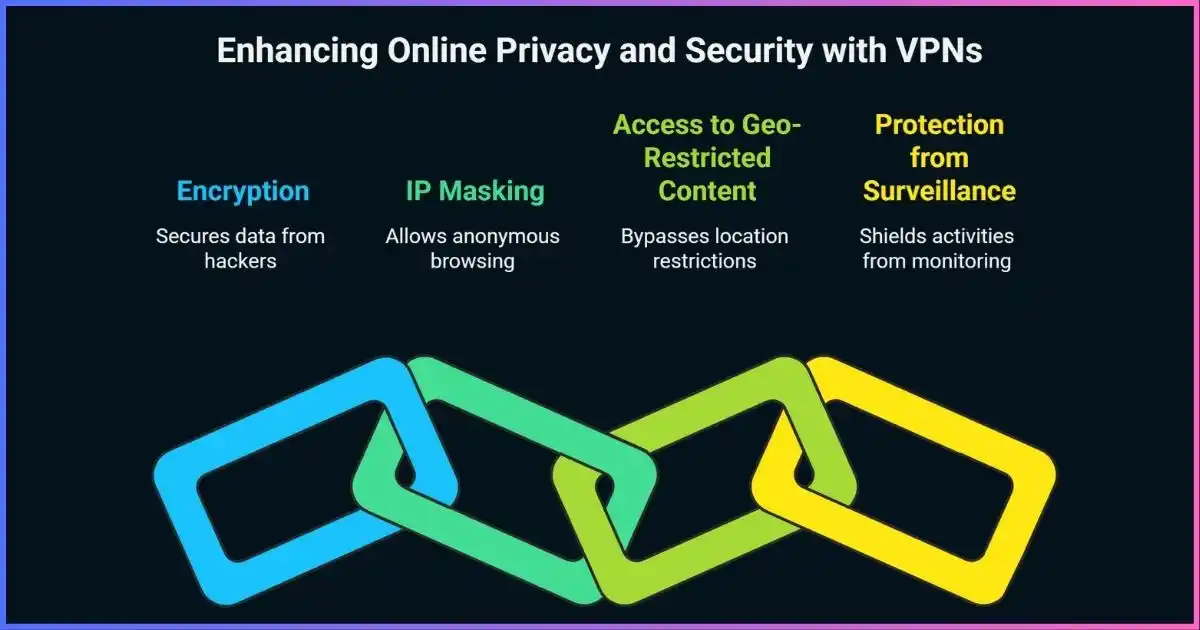
Table of Contents
How VPN protection worksA VPN encrypts a network path, not your whole online identity
When a VPN connects, your device authenticates with a remote VPN endpoint and establishes cryptographic session keys. The operating system routes selected packets into a virtual interface. The VPN client encapsulates and encrypts those packets, sends them across the internet to the endpoint, and the server forwards them toward the destination. Replies return through the protected tunnel.
The local network and ISP can often see the VPN endpoint, timing, and traffic volume, but properly encrypted tunnel payloads are not readable in transit. The VPN provider becomes the next party you trust: depending on design, it may see DNS requests, destination IP addresses, timestamps, or other connection metadata. HTTPS typically protects page content and full URL paths between your browser and the website, even after traffic leaves the VPN server.
VPN scope is configuration-dependent. Split tunneling, IPv6 behavior, browser DNS-over-HTTPS, app-specific resolvers, and local-network routes can create traffic paths outside the tunnel. See our guide to how VPNs work.
PrivacyCore privacy benefits of using a VPN
Masking your public IP address from destinations
For traffic that exits through the VPN, websites generally receive the VPN server’s public IP address instead of your home or mobile connection IP. This can reduce direct exposure of your subscriber address to a website and make IP-based location less precise. It may be useful when traveling, using peer-to-peer applications, or testing a service from a different network location.
IP masking is only one signal. Accounts, cookies, browser and TLS fingerprints, device IDs, GPS, payment information, and behavior can still identify or correlate activity. A VPN does not erase information you share or make logged-in browsing anonymous.
Reducing local-network and ISP visibility
When DNS and app traffic are routed through the VPN, the Wi-Fi operator or internet provider generally sees a connection to the VPN endpoint rather than a direct connection to every destination. It can still observe that a VPN is in use, along with timing and approximate data volume. The VPN service may then see some metadata that the access provider no longer sees. This is a trust transfer, not a disappearance of all observers.
Protecting DNS requests on the access path
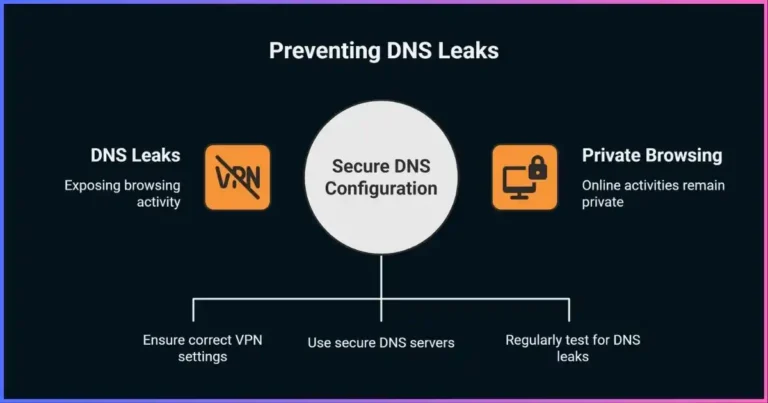
DNS translates domain names into network addresses. If ordinary DNS requests travel outside the VPN, the local network or ISP may see the queried domains. A VPN can route DNS through its tunnel to a resolver, but browser DNS-over-HTTPS and operating-system resolver settings can change the path. An unfamiliar public DNS resolver does not automatically mean a leak; determine whether the query left through the intended interface. Our DNS leak guide explains how to test it.
Reducing exposure to some forms of tracking
Changing the exit IP can make simple IP-based profiling less consistent across networks. It does not prevent tracking through first-party accounts, cookies, advertising IDs, browser fingerprinting, or third-party scripts. Combine VPN use with browser privacy controls, tracker protection, careful app permissions, and account hygiene when those threats matter.
SecurityVPN security benefits on public Wi-Fi and shared networks
Encrypting traffic across an untrusted access network
A VPN can protect traffic routed through its tunnel from passive observation or tampering on the local Wi-Fi path. This is useful on hotels, airports, cafés, and other shared networks, particularly for applications that do not otherwise protect every connection well. HTTPS is also essential and is widely used by websites; a VPN does not make a malicious hotspot legitimate or bypass a fake captive portal safely.
Use unique passwords and multifactor authentication, keep your operating system updated, turn off unnecessary file sharing, and avoid certificate warnings. The U.S. Cybersecurity and Infrastructure Security Agency advises users of public Wi-Fi to prefer encrypted HTTPS connections and use a VPN when available. This layered approach addresses more risks than relying on a VPN alone.
Reducing direct exposure of your device
Because destination services see the VPN exit address for tunneled requests, they do not see your home IP as the source of that particular connection. A VPN may therefore reduce unsolicited inbound attention to the home address in some setups. But a consumer VPN is not a firewall substitute: NAT, host firewall rules, router security, patches, endpoint protection, MFA, and backups remain important.
Providing authenticated remote access
Businesses use remote-access VPNs to connect authorized users to internal systems. Authentication, device posture checks, least-privilege routes, network segmentation, and monitoring determine how safe that access is. A VPN encrypts the path; it does not prove the user’s device is clean or restrict what a compromised endpoint can do unless additional controls are in place.
Kill switches and fail-closed behavior
A VPN kill switch uses firewall or routing rules to block traffic that would otherwise go directly to the internet when a tunnel drops. Implementations differ: some only block after an unexpected interruption, while always-on modes block whenever the VPN is disconnected. Split tunneling can conflict with kill-switch behavior on some platforms. Check provider and operating-system documentation, enable the mode that fits your needs, and test a disconnect on a non-sensitive connection. See our VPN kill-switch guide.
What a VPN helps protect—and what still needs attention
Qualitative scope guide; protection depends on correct routing and application behavior.Qualitative illustration, not measured percentages or a security rating. The VPN provider may see connection metadata; the visual highlights which party’s view changes.
Realistic expectationsVPNs and anonymity: what they can and cannot do
A VPN can make it harder for a local network to associate your direct IP address with every destination connection, and it can mask your source IP from websites for tunneled traffic. It cannot guarantee that nobody can identify you. The VPN provider sees the incoming connection, while the destination sees the VPN exit; timing correlation or account identity can connect activity across the path.
| Signal | What a VPN changes | What it does not remove |
|---|---|---|
| Public source IP | Destination sees VPN exit for traffic using tunnel | VPN provider sees your connecting IP; direct-route apps can expose it |
| DNS visibility | Can route DNS through VPN resolver | Browser/OS DNS settings may use another path; query metadata still exists at resolver |
| Website identity | May change IP-based location signal | Logins, cookies, device fingerprint, GPS, and payment details |
| Local network observer | Cannot read correctly encrypted tunnel contents | Can see VPN endpoint, timing, and volume; device may still contact local network |
| VPN provider | Becomes the new network intermediary | Can technically process connection metadata; policy and architecture govern retention |
For stronger browser-level anonymity, Tor Browser uses multiple relays and includes defenses intended to reduce fingerprinting; it also has different performance and compatibility trade-offs. Adding a commercial VPN does not automatically improve Tor’s anonymity and may change the trust model. Read the Tor Project’s safe-use guidance before combining tools.
No-logs claims and jurisdiction
“No logs” is not a standardized technical label. Separate activity data (websites, DNS, content) from connection metadata (source IP, timestamps, chosen server, byte counts), diagnostics, crash reports, account records, and billing information. Review exactly what a provider says it collects and for how long.
An independent review is more useful when it identifies the systems examined, audit date, evidence and limitations, findings, remediation, and whether the report is public. A policy review does not necessarily verify server behavior; an app audit does not necessarily examine backend logging. Jurisdiction matters, but country or intelligence-alliance labels alone do not establish a provider’s privacy quality. Ownership, applicable law, architecture, server locations, transparency reports, and past responses to legal requests are more concrete evidence.
Threat modelWhich online threats can a VPN help address?
Rather than repeat broad cybercrime totals that do not measure VPN effectiveness, match the tool to the threat. A VPN is most directly useful when you need to protect a network path or route traffic through a trusted endpoint. It is much less useful against threats that operate inside your device, browser, or accounts.
| Threat or concern | VPN contribution | Additional protection |
|---|---|---|
| Passive monitoring on shared Wi-Fi | Encrypts traffic routed through the tunnel to endpoint | HTTPS, trusted hotspot, updates, disable sharing |
| ISP visibility into destinations | Can hide direct DNS/destination connections when all relevant traffic uses tunnel | Verify DNS/IPv6/app routes; understand VPN operator visibility |
| Phishing and credential theft | Little direct protection | Password manager, MFA/passkeys, URL checks, browser protections |
| Malware or compromised device | Does not clean or isolate infected endpoints | Updates, endpoint protection, least privilege, backups |
| Account/cookie tracking | Changes exit IP, not identity already shared with sites | Privacy settings, tracker controls, separate accounts/profiles |
| Remote company access | Provides an encrypted route and authenticated access when managed correctly | MFA, device checks, segmentation, least privilege, monitoring |
| Blocking/censorship | May help where VPN use and endpoint remain reachable | Assess local law and provider protocol/obfuscation limits; no guaranteed bypass |
VPNs may be detected or blocked by services and network operators. Obfuscation can reshape protocol signals but does not hide the VPN endpoint, traffic volume, or guarantee that a connection will be undetectable. Do not rely on a VPN for safety in a high-risk environment without a broader threat plan.
Technical foundationsVPN protocols, encryption, DNS, and leak protection
Protocols define authentication, key negotiation, packet format, encryption, and transport. WireGuard uses a compact modern design and UDP transport; it has no built-in TCP mode or obfuscation. OpenVPN is a mature TLS-based protocol supporting UDP and TCP, with current configurations negotiating authenticated-encryption ciphers such as AES-GCM and ChaCha20-Poly1305 where available. IKEv2/IPsec is widely integrated with operating systems and can handle network changes in supported clients. There is no universal protocol speed ranking: implementation and route matter.
| Protocol | Common strengths | Considerations |
|---|---|---|
| WireGuard | Small design, modern cryptography, efficient roaming support | UDP only; no built-in obfuscation; provider manages keys/endpoints |
| OpenVPN | Mature, configurable, UDP and TCP options, broad ecosystem | More configuration complexity; TCP-over-TCP may perform poorly under loss |
| IKEv2/IPsec | OS integration and reconnection/mobility support in many clients | Algorithm and behavior vary by client and deployment |
| PPTP / weak legacy setup | Historical compatibility | PPTP is obsolete and should not be used for security; L2TP alone does not encrypt |
Encryption strength is not determined by key length alone. Correct peer authentication, safe key exchange, authenticated encryption, implementation quality, updates, and routing are all important. AES-128 and AES-256 are both strong when used correctly with modern modes; “unbreakable” and “military-grade” are not useful summaries of a complete VPN’s security.
DNS and IP leak checks
A DNS leak means DNS requests took an unintended path relative to your privacy goal. A resolver name alone does not prove a leak: a public encrypted DNS resolver may be reached inside the VPN tunnel. Test the disconnected baseline, steady VPN connection, and reconnect/network-transition states. Check IPv4 and IPv6, browser Secure DNS, system resolver, and the app’s split-tunnel rules.
Kill switch and always-on VPN
On supported systems, an always-on VPN or “block connections without VPN” setting can enforce fail-closed routing. App kill switches differ by operating system and distribution. Read the platform-specific behavior and test it after a forced connection drop. A kill switch cannot prevent traffic you deliberately excluded from the VPN.
Provider checklistHow to choose a VPN for privacy and security
A VPN provider can technically process information about connections passing through its servers, so assess the company and its operations rather than relying on a privacy slogan.
- Define your threat and traffic scope.Decide whether you need public-Wi-Fi protection, remote network access, reduced ISP visibility, or another specific capability. List devices and apps that must use the tunnel.
- Identify the operator and ownership.Find the legal company, parent ownership, support channel, applicable terms, and transparency history.
- Read the data policy by category.Look for activity, DNS, source IP, timestamps, server selection, diagnostics, account, and billing records; check retention and sharing.
- Inspect independent reports.Prefer public reports with named auditor, date, scope, systems examined, exceptions, and remediation. Distinguish app security tests from server-side logging assurance.
- Check technical controls.Modern protocols, DNS and IPv6 handling, kill switch, auto-connect, split tunneling, app updates, and authentication support should be documented.
- Review jurisdiction and legal context.Consider the actual laws, company ownership, server location, and provider architecture. Do not treat intelligence-sharing alliance membership as a standalone score.
- Test the service and terms.Check connection reliability, needed locations, device limits, renewal price, cancellation, and refund terms. Test IP/DNS behavior and kill switch on your own devices.
See our VPN provider guide for broader comparison criteria. The affiliate offer below is a commercial link, not a claim that one provider is best for every threat model.
Use it wellVPN setup and privacy verification checklist
- Install the official app.Download from the provider’s official site or recognized app store and verify the developer identity.
- Update the OS and client.Keep software current; use a unique account password and MFA where available.
- Select the recommended secure protocol.Use a maintained default unless a documented compatibility need requires a change.
- Review routes and DNS.Understand split tunneling, excluded applications, local network access, IPv6, and any custom DNS/DoH settings.
- Set auto-connect and kill switch.Choose how the app should behave on public or untrusted networks and whether all traffic should stop when the tunnel is unavailable.
- Check public IP and DNS paths.Compare direct and connected behavior, then test the actual browsers and apps you use. A changed IP alone does not prove all traffic is protected.
- Test reconnects safely.On a non-sensitive network, switch Wi-Fi/mobile, sleep and wake, and simulate disconnect to confirm the behavior you expect.
- Recheck after changes.App, OS, browser, DNS, or provider updates can affect routes and leak protection.
Do not blindly disable IPv6 or replace system DNS to fix a suspected leak. Determine which interface and resolver handled the request first. Read our DNS leak troubleshooting guide and kill switch guide.
Common questionsVPN privacy and security FAQs
Does a VPN protect my privacy?
Does a VPN make me anonymous?
Can a VPN protect me on public Wi-Fi?
Can my internet provider still see that I use a VPN?
Can the VPN company see my browsing?
Will using a VPN stop ads and trackers?
Are free VPNs safe?
Does a VPN slow down internet speeds?
Is it legal to use a VPN?
Protect the path and check the limits
A reputable VPN can add useful network privacy, but it works best as one layer in a broader security plan.
Explore a VPN option →Conclusion: VPN privacy and security benefits
A VPN’s clearest benefits are encrypting traffic to a VPN endpoint, reducing direct visibility for the local network and access provider when routes and DNS are configured correctly, changing the exit IP seen by destinations, and enabling authenticated remote access. These protections can matter on shared networks and in managed access scenarios.
A VPN does not guarantee anonymity, stop malware or phishing, erase account-based tracking, or remove the need to trust a provider. Choose based on the threat you face, verify audit scope and data practices, test routes and failure handling, and combine the VPN with HTTPS, updates, MFA, and careful browsing.
Disclosure: Some links on this page are affiliate links. JoshWP may earn a commission if you purchase through them, at no extra cost to you. Affiliate relationships do not determine the technical criteria in this guide.
Sources & comparison methodology
This is an educational guide, not a quantified VPN-provider test. Benefits are described by network layer and threat model; no unsupported attack, user adoption, speed, protocol score, or encryption-breaking-time statistics are used. Provider audit examples below are evidence about the specific scope and date of the reports, not a guarantee of future behavior. Protocol suitability depends on implementation and configuration.
- U.S. Federal Trade Commission: what to consider when choosing a VPN app
- CISA: Best Practices for Using Public Wi-Fi
- WireGuard: protocol design
- OpenVPN 2.6 manual
- Proton VPN: 2026 no-logs audit information and reports
- KPMG ISAE 3000 report on ExpressVPN controls (scope dated February 2025)
- Private Internet Access: 2025 independent audit announcement
- JoshWP: How VPNs work
- JoshWP: VPN provider guide
Provider policy pages and audits have defined scope and can change. Review the report itself, the provider’s current policy, and platform-specific client documentation before relying on a particular feature.