Surfshark VPN Review
Surfshark is the best-value mainstream VPN for households with many devices. One paid subscription covers unlimited simultaneous connections, while WireGuard, a kill switch, CleanWeb, Bypasser, Dynamic MultiHop, Rotating IP, NoBorders, and 4,500-plus RAM-only servers make it far more than a cheap option. This Surfshark VPN review also examines the trade-offs: renewal pricing is less transparent than the introductory deal, advanced features vary by platform, SmartDNS was discontinued, and the Netherlands jurisdiction will not appeal to every privacy purist.
Our verdict: the best VPN for unlimited-device value
Surfshark combines low first-term pricing, independently assessed no-logs controls, modern infrastructure, strong streaming and travel tools, and rare unlimited-device coverage. Choose Starter unless you specifically need antivirus, breach monitoring, private search, or Incogni.
Table of Contents
- Quick verdict
- Surfshark at a glance
- Pricing and plans
- Privacy and logging
- Security and protocols
- Server network
- Speed and reliability
- Streaming and TV devices
- Gaming
- Torrenting and P2P
- Apps and device support
- Features in detail
- Setup and recommended settings
- Surfshark vs alternatives
- Pros and cons
- FAQs
- Final verdict
- Sources and methodology
The short versionIs Surfshark VPN Good?
Yes. Surfshark is an excellent all-purpose VPN and the strongest value choice for families, shared households, and users with many devices. It combines unlimited paid-plan connections, 4,500-plus servers in 100 countries, WireGuard with a post-quantum layer, a documented kill switch, split tunneling, obfuscation, multi-hop, IP rotation, streaming apps, and repeated Deloitte no-logs assurance.
The current Starter deal—$67.23 for the first 27 months, or $2.49 per included month—is competitive. The catch is renewal: Surfshark says the long plan renews annually at the applicable rate, but its public pricing page did not expose one stable renewal dollar figure during research. Record the exact renewal shown at checkout.
Best for: value, households, streaming, travel, and everyday privacy. Skip it if: you need included inbound port forwarding, a permanent free tier, or guaranteed feature parity across every operating system. Surfshark ranks near the top of our best VPN providers guide.
Surfshark editorial scorecard
Evidence-based ratings, not universal speed-test results.
- Value and device allowance9.7
- Privacy evidence9.3
- Feature depth9.5
- Apps and usability9.4
- Performance architecture9.0
Plans and fine printSurfshark Pricing: Starter vs One vs One+
Surfshark sells three bundles in monthly, annual, and two-year terms. The underlying VPN is the same; higher tiers add separate security and privacy products. The two-year offers below include three bonus months and are billed upfront.
| Plan | 24 months + 3 extra | 12 months | Monthly | Main inclusions |
|---|---|---|---|---|
| Starter | $2.49/mo $67.23 first 27 months | $3.39/mo $40.68 first year | $16.45 | VPN and Alternative ID |
| One | $2.79/mo $75.33 first 27 months | $3.59/mo $43.08 first year | $18.95 | Starter + Antivirus, Alert, Search |
| One+ | $4.49/mo $121.23 first 27 months | $7.49/mo $89.88 first year | $21.85 | One + Incogni data-removal service |
USD snapshots; VAT may apply. Regional identity-theft or newly launched scam-protection benefits can appear separately and may have eligibility conditions. Confirm the final checkout.
Effective monthly price by plan term
Introductory USD figures from Surfshark’s current plan guide. Longer terms are prepaid.
Which plan is worth it?
Starter
Best for most people. It contains the complete VPN and Alternative ID. Nothing about tunnel quality or server access requires One.
One
Worth the small introductory difference if you will actually use certified antivirus, breach monitoring, and private search on supported devices.
One+
Choose it when Incogni’s recurring data-broker removal is available in your region and replaces a service you would otherwise buy separately.
Trial, renewal, and refund rules
Eligible new users can receive a seven-day trial with a 12- or 24-month web purchase using supported card, PayPal, or Apple Pay methods. Trial use is capped at three devices; unlimited connections begin after conversion to a paid term. The subscription auto-renews unless canceled.
Surfshark’s two-year term renews annually afterward. Its public pricing page did not expose one stable renewal dollar amount during research, so screenshot the checkout renewal disclosure and set a reminder. Turning off auto-renewal stops the next charge but does not itself request a refund.
Trust and evidenceSurfshark Privacy, Jurisdiction, and No-Logs Policy
Surfshark B.V. is based in the Netherlands. Jurisdiction alone neither proves nor defeats privacy; what matters more is what the service records, what its infrastructure permits, and whether outsiders have examined the controls.
The privacy policy updated August 27, 2026 states that Surfshark does not retain visited IP addresses, browsing history, session history, used bandwidth, stored connection timestamps, network traffic, or similar online-activity data. VPN servers temporarily process a user ID and/or source IP plus connection timestamps to operate the service, deleting them automatically within 15 minutes after the session ends.
Account-security records are separate. Surfshark can retain device name, operating system, app version, and last-login date while the subscription is active and for up to two years after the last login. Diagnostics and specialized protection features can process additional data with consent under their stated limits. That is more precise than saying “nothing is ever collected.”
Independent no-logs assurance
Deloitte assessed Surfshark’s no-logs controls in 2023 and again in 2025. The later ISAE 3000 engagement covered standard, static, and multiport VPN servers, configuration and deployment processes, privacy settings, and relevant operating procedures. Its conclusion supported Surfshark’s stated no-logs implementation at the time examined.
Surfshark’s April 2026 transparency update disclosed one binding Amsterdam District Court warrant. The company reported that it could provide account-existence confirmation and payment information but no online-activity records. This is useful real-world evidence about available data, although no audit or warrant response guarantees future behavior permanently.
RAM-only servers and infrastructure audits
Surfshark says the entire VPN fleet runs from volatile RAM rather than persistent server disks. Rebooting reloads a controlled image and clears volatile state. Its Trust Center also lists a late-2025 SecuRing infrastructure assessment and a 2026 Cure53 assessment covering infrastructure and the Dausos protocol.
Under the hoodSecurity, Encryption, and VPN Protocols
WireGuard
The best default for speed, streaming, gaming, roaming, and routine use. Surfshark adds a post-quantum protection layer in supported native apps; manual WireGuard configurations do not receive it.
OpenVPN TCP/UDP
The compatibility fallback. UDP favors speed; TCP favors delivery reliability. Camouflage obfuscation is tied to OpenVPN.
IKEv2
Useful for rapid reconnection on changing mobile networks where available, although WireGuard is normally the modern first choice.
Dausos beta
A proprietary, Cure53-audited protocol with dedicated per-user tunnels and post-quantum design. It was limited to the macOS App Store build when checked.
Dausos is interesting but should not decide the purchase yet. Surfshark labels it beta, claims up to 30% faster connections under supported conditions, and advises switching back to WireGuard/OpenVPN if features or stability fail. Platform expansion remains future work.
Post-quantum protection in context
Surfshark’s post-quantum layer is meant to protect VPN key establishment from future “harvest now, decrypt later” attacks. It does not make every website, message, or device quantum-safe. NIST finalized its first principal post-quantum standards in 2024 and recommends beginning migration; the NIST announcement provides the wider technical context.
Kill switch and leak protection
The kill switch is documented on Windows, macOS, Linux, Android, and iOS. It blocks ordinary connectivity when the VPN unexpectedly drops. Bypassed apps and sites are intentionally outside the encrypted route, so verify exclusions carefully. Surfshark also routes DNS through its own infrastructure while connected and supplies IP/DNS leak-test tools.
InfrastructureSurfshark Server Network: 4,500+ Servers in 100 Countries
Surfshark’s live directory lists 4,500-plus servers in 100 countries. Every server is advertised with at least a 10 Gbps port, while selected high-demand infrastructure reaches 100 Gbps. The network includes physical and clearly indicated virtual locations, plus standard, static, MultiHop, P2P, and Dedicated IP options where available.
A virtual location provides an IP associated with one country while the hardware operates elsewhere. That expands coverage where reliable physical hosting is difficult, but users with legal, latency, or data-residency requirements should inspect the physical-location label rather than relying only on the flag.
Country coverage among leading VPNs
Current provider-published totals. Definitions and virtual-location inclusion differ.
Surfshark’s country map is smaller than NordVPN or Proton VPN but covers far more countries than most households need. Server distance, load, ISP peering, and protocol matter more than the raw fleet count for one connection.
Real-world expectationsSurfshark Speed, Everlink, and FastTrack
Surfshark has strong performance ingredients: WireGuard, 10 Gbps-or-better ports, broad regional coverage, and two newer infrastructure systems. Everlink is a self-healing layer designed to move an active tunnel away from an unhealthy backend without exposing the normal IP. FastTrack can evaluate a network of routes rather than relying on one static server path.
Those features do not justify one permanent speed percentage. Baseline line speed, Wi-Fi, hardware, country distance, server load, protocol, time, ISP peering, and destination all change the result. A responsible test compares the same device and endpoint over several nearby Surfshark servers, both wired and wireless, at more than one time of day.
| Use case | Start with | Avoid unless needed | Reason |
|---|---|---|---|
| Everyday browsing | Fastest location + WireGuard | MultiHop | Minimizes distance and extra hops |
| 4K streaming | WireGuard + required country | Rotating IP | Stable IPs can reduce playback rechecks |
| Gaming | WireGuard + closest suitable region | OpenVPN TCP/MultiHop | Lower protocol overhead and route length |
| Restricted network | NoBorders, then OpenVPN Camouflage | Assuming one protocol works everywhere | Blocking resistance can matter more than peak speed |
| Sensitive browsing | WireGuard + kill switch; MultiHop selectively | Bypasser exclusions | Reduces accidental clear-route traffic |
EntertainmentSurfshark for Streaming and Smart TVs
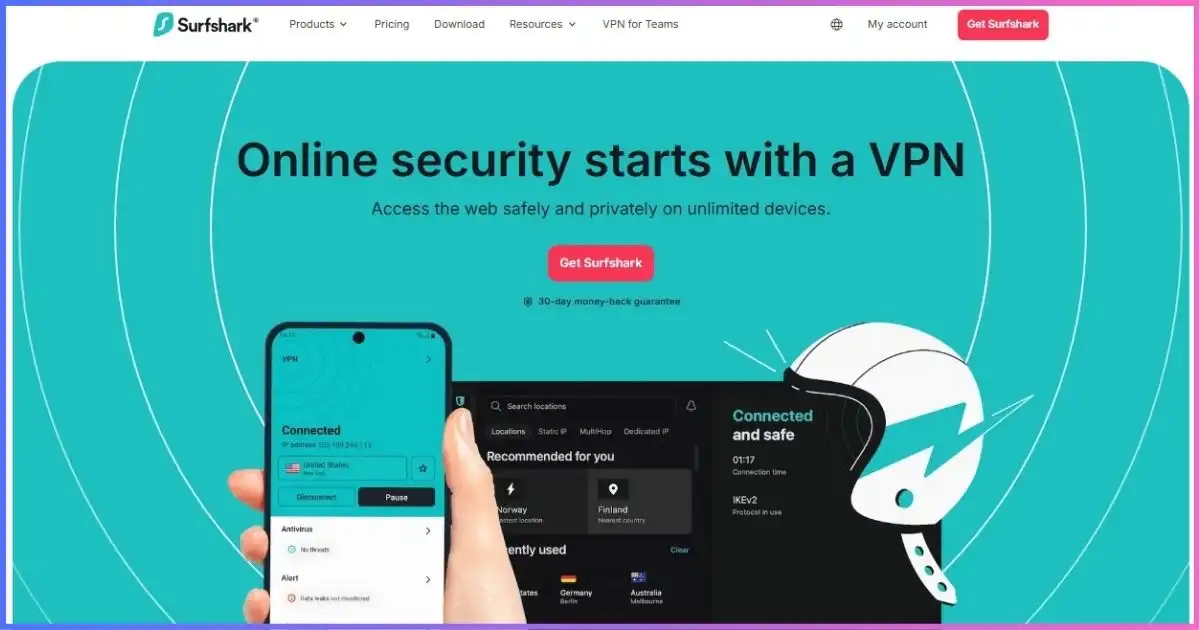
Surfshark is a strong streaming choice because unlimited devices cover every television, phone, tablet, and laptop in the household. Native apps are available for Apple TV, Android TV, and Fire TV, while desktop/mobile apps and browser extensions cover personal screens. Bypasser can keep local banking or delivery apps outside the VPN while a streaming app uses the encrypted route.
Current alternatives for unsupported screens are a compatible VPN router or a VPN-protected hotspot from a computer. Surfshark Public DNS is only a DNS resolver; it does not create an encrypted VPN tunnel, hide the home IP, or provide ordinary VPN region selection.
Streaming access can change by service, country, account, app, device, server IP, and time. Test full playback during the refund window rather than assuming a login page proves access. Surfshark ranks highly in our best VPNs for streaming guide.
One Surfshark plan covers the whole household
Unlimited paid connections are Surfshark’s defining value advantage. Starter includes the complete VPN—upgrade only for separate security products you will use.
Get Surfshark Starter →Low-overhead routingSurfshark for Gaming
Surfshark is a good gaming VPN when WireGuard and a nearby endpoint replace inefficient ISP routing, hide the residential public IP from direct peers, or provide an alternate regional path. FastTrack and Everlink target route quality and resilience, while unlimited connections cover computers, phones, handhelds, and a router without managing slots.
A VPN cannot guarantee lower ping. It adds a hop, may worsen NAT behavior, and cannot fix weak Wi-Fi, game-server overload, device limitations, or attacks against the game company. Avoid MultiHop, distant endpoints, and OpenVPN TCP for latency-sensitive play unless a restrictive network forces them.
Consoles normally require a compatible router or shared computer connection. Public DNS does not supply encrypted gaming traffic or DDoS-oriented IP masking. Compare console and route options in our gaming VPN guide.
P2PSurfshark for Torrenting
Surfshark supports P2P, and its directory identifies applicable locations. WireGuard, auto-connect, unlimited devices, DNS leak protection, and a documented kill switch form a good safety baseline. Make sure Bypasser does not exclude the torrent client, and bind the client to the Surfshark adapter where the software supports it.
The limitation is inbound connectivity: Surfshark does not provide ordinary VPN-side port forwarding. BitTorrent still works through outbound connections, but seeding and small swarms may be less efficient. A static or Dedicated IP is not the same as an open inbound port.
Only download and share authorized content. A VPN masks the residential IP from peers and encrypts traffic to the VPN server; it does not make infringement legal, scan every file, or prevent accidental folder sharing. Users who need forwarding can compare alternatives in our top torrenting VPN guide.
Platform paritySurfshark Apps and Unlimited Devices
| Platform | Core support | Notable features | Main caveat |
|---|---|---|---|
| Windows | Native app | WireGuard/OpenVPN, kill switch, Bypasser, MultiHop, Rotating IP, Antivirus on One | Some advanced modes cannot run together |
| macOS direct | Native DMG app | WireGuard/OpenVPN, kill switch, Bypasser, MultiHop, Rotating IP | Dausos beta is not in this build |
| macOS App Store | Sandboxed native app | Dausos beta plus standard VPN controls | Beta protocol may have feature/stability gaps |
| Linux | Native app | WireGuard/OpenVPN, kill switch, auto-connect, CleanWeb | Feature parity differs from Windows/macOS |
| Android | Native app | Bypasser, MultiHop, Rotating IP, GPS override, small-packets option | GPS override is Android-specific |
| iPhone/iPad | Native app | WireGuard, Bypasser, MultiHop, Rotating IP, kill switch | iOS imposes background/network limitations |
| Apple TV | Native app | Encrypted VPN and CleanWeb support | No retired SmartDNS fallback |
| Android/Fire TV | Native apps | VPN tunnel and CleanWeb | Fewer advanced controls than desktop |
| Browser extensions | Chrome, Firefox, Edge | Browser-only encrypted proxy, site Bypasser, enhanced CleanWeb | Other apps remain outside the extension |
| Routers | Manual/compatible firmware | Whole-network coverage | Speed and features depend on router hardware |
The seven-day trial is limited to three devices, but a paid subscription permits unlimited simultaneous connections. Surfshark still expects personal or household-style use; “unlimited” is not permission to resell access or operate an unauthorized public service.
Beyond the tunnelSurfshark Features Explained
CleanWeb
Blocks known ads, trackers, malicious domains, and phishing destinations. VPN-app and browser-extension versions differ; no filter removes every first-party or embedded ad.
Bypasser
Split tunneling for selected apps or sites on supported platforms. Excluded traffic uses the ordinary connection and is outside VPN kill-switch protection.
Dynamic MultiHop
Routes through two VPN servers and lets users choose entry/exit pairs. Useful selectively for route separation, but slower than a direct connection.
Rotating IP
Changes the visible IP every 5–10 minutes without dropping the tunnel. It cannot run with Dedicated IP, Static IP, or MultiHop routes.
NoBorders and Camouflage
NoBorders surfaces suitable connections on restrictive networks. Camouflage obfuscates OpenVPN traffic, trading some performance for blocking resistance.
Alternative ID
Generates an alternate persona and email relay for registrations. It reduces exposure of a primary inbox but does not authorize false claims or identity fraud.
Dedicated IP vs Static IP
A Surfshark Static IP location gives the same IP on repeat connections, but other Surfshark users can share it. A paid Dedicated IP belongs only to one account, reduces shared-IP CAPTCHA problems, and can simplify allowlisting. One Dedicated IP is allowed per account, its location cannot be changed after activation, and it does not include port forwarding.
Dedicated IP trades away shared-IP anonymity and may be non-refundable depending on how it is purchased. Choose it for business allowlists and IP-sensitive services, not as an automatic privacy upgrade.
Surfshark One and One+
Surfshark One adds Antivirus, Alert breach monitoring, and private Search. One+ adds Incogni, which submits data-removal requests to supported brokers. These products have their own platform, geographic, and data-processing requirements. Their presence does not change VPN server access or tunnel quality.
How our 9.1/10 score is weighted
The overall score emphasizes privacy/security and real VPN utility over bundle size.
- Privacy and security25%
- Performance and network25%
- Apps and features20%
- Price and devices15%
- Streaming, gaming, P2P15%
Recommended configurationHow to Set Up Surfshark Correctly
- Choose Starter unless you need separate suite products. Save the upfront total, renewal price, next billing date, and refund exclusions.
- Install the correct native app. Avoid unofficial downloads. On macOS, understand the DMG/App Store differences before choosing Dausos beta.
- Start with WireGuard and Fastest Location. This creates a performance baseline. Enable auto-connect on untrusted networks.
- Turn on the kill switch and CleanWeb. Interrupt Wi-Fi once and check whether the exact device fails closed as expected.
- Use Bypasser sparingly. Every exclusion uses the normal IP. Recheck rules after OS or app updates.
- Test IP and DNS routing. Confirm that visible addresses match the selected location, then test the actual streaming, game, or P2P workload.
- Set a renewal reminder. Canceling auto-renewal preserves access through the prepaid term but does not automatically request a refund.
For travel, install and sign in before departure. Restricted networks can block VPN websites or account logins. Our travel VPN guide covers router, captive-portal, and public-Wi-Fi preparation.
A VPN secures the path to its endpoint but cannot make a phishing page trustworthy or replace updates and multifactor authentication. The FTC’s public Wi-Fi guidance explains how widespread HTTPS improved hotspot safety while scam awareness and device security remain necessary.
Market contextSurfshark vs NordVPN, ExpressVPN, Proton VPN, and PIA
| VPN | Long-term entry* | Network snapshot | Devices | Refund | Best fit |
|---|---|---|---|---|---|
| Surfshark | $2.49/mo | 4,500+ servers / 100 countries | Unlimited | 30 days | Unlimited-device value |
| NordVPN | $3.49/mo | 8,027 servers / 150 countries | 10 | 30 days | Best all-around mature feature set |
| ExpressVPN | $2.99/mo | 113 countries; no current server total | 10–14 by tier | 30 days | Premium simplicity and router experience |
| Proton VPN | $2.99/mo | 20,798 servers / 149 countries | 10 | 30 days | Open-source privacy and free tier |
| Private Internet Access | $2.03/mo | 91 countries / 154 locations | Unlimited | 30 days | Customization and port forwarding |
*Introductory monthly equivalents on different prepaid terms. Taxes, bonus months, renewals, and eligibility differ.
Which alternative should you choose?
NordVPN has a larger country network and more mature specialty-server ecosystem; compare NordVPN vs Surfshark. ExpressVPN favors simplicity, routers, and higher device limits by tier rather than unlimited connections; see ExpressVPN vs Surfshark. SafeShell is weaker overall but uniquely routes different apps through different countries simultaneously, explored in Surfshark vs SafeShell.
Balanced assessmentSurfshark VPN Pros and Cons
Pros
- Unlimited simultaneous paid-plan devices
- Low introductory Starter price
- 4,500+ RAM-only servers in 100 countries
- Every server advertised at 10 Gbps or better
- WireGuard with post-quantum protection in supported apps
- Deloitte no-logs assurance in 2023 and 2025
- Kill switch, CleanWeb, Bypasser, MultiHop, Rotating IP, NoBorders
- Native Apple TV, Android TV, and Fire TV apps
- Alternative ID included with Starter
Cons
- Stable renewal dollar amount not exposed on the public pricing page
- Feature parity differs materially by platform
- SmartDNS discontinued in February 2026
- No VPN-side inbound port forwarding
- Dausos remains a macOS App Store beta
- Dedicated IP costs extra, one per account, fixed location
- Refund excludes renewals and certain add-ons
- Netherlands jurisdiction may concern some threat models
Common questionsSurfshark VPN Review FAQs
Is Surfshark VPN safe?
Yes. Surfshark uses modern protocols, RAM-only servers, a kill switch, private DNS, post-quantum WireGuard protection on supported apps, infrastructure assessments, and repeated Deloitte no-logs assurance. No VPN removes every risk, and optional products have different data requirements.
Does Surfshark keep logs?
Surfshark says it does not retain browsing history, visited IPs, bandwidth, network traffic, session history, or stored connection timestamps. Servers temporarily process user ID and/or source IP plus connection timestamps and delete them within 15 minutes after a session. Account, billing, device-security, consented diagnostic, and optional-product data are separate.
How much does Surfshark cost?
The checked Starter offer cost $67.23 for the first 27 months, equal to $2.49 per included month. The official plan guide listed $40.68 for the first year and $16.45 month-to-month. One and One+ cost more because they add separate security/privacy products. Taxes and renewal prices vary.
Which Surfshark plan should I choose?
Starter is best for most buyers because it includes the full VPN and Alternative ID. Choose One for Antivirus, Alert, and Search. Choose One+ only if Incogni’s recurring data-broker removal is available and valuable in your region.
Does Surfshark really allow unlimited devices?
Paid plans allow unlimited simultaneous connections for legitimate personal or household use. The seven-day trial is capped at three devices. Surfshark can still enforce terms against resale, abuse, or unauthorized public sharing.
Does Surfshark work for streaming?
Surfshark supports major desktop, mobile, Apple TV, Android TV, and Fire TV platforms and is a strong streaming option. Access can change by service, account, region, app, and server. SmartDNS was discontinued on February 2, 2026, so unsupported devices now need a router or protected hotspot.
Is Surfshark good for gaming?
Yes. WireGuard, broad coverage, unlimited devices, FastTrack, Everlink, and router support make it a strong general gaming VPN. It may improve poor ISP routing but cannot guarantee lower ping or fix weak Wi-Fi and game-server congestion.
Is Surfshark good for torrenting?
Surfshark supports P2P and provides WireGuard, a kill switch, auto-connect, and leak protection. It does not provide VPN-side inbound port forwarding, which can reduce seeding and small-swarm connectivity.
Does Surfshark have a free trial and refund guarantee?
Eligible new users can get a seven-day trial with qualifying 12- or 24-month web purchases and supported payment methods. Eligible first purchases have a 30-day refund window. Renewals, previously refunded accounts, some stores, and certain add-ons are excluded.
What happened to Surfshark SmartDNS?
Surfshark discontinued SmartDNS on February 2, 2026. Restore automatic DNS on devices previously configured with it. Use a native Surfshark TV app, a compatible VPN router, or a VPN-protected computer hotspot instead.
Final Verdict: Surfshark Is the Best Unlimited-Device Value
Surfshark earns 9.1/10. Its combination of unlimited paid connections, low introductory pricing, audited no-logs controls, RAM-only infrastructure, strong protocols, TV apps, and unusually deep routing features makes it the best-value premium VPN for most households.
The caveats are manageable but real: save the renewal price from checkout, do not expect every feature on every platform, forget old SmartDNS guides, and choose a different provider if included port forwarding is essential. Starter is the right plan for most people; One and One+ should be judged as separate product bundles rather than “better VPN” tiers.
Affiliate disclosure: We may earn a commission if you buy through a marked link, at no additional cost to you. Affiliate relationships do not change our score, limitations, or methodology.
Sources & comparison methodology
Research date: September 18, 2026. This review uses current official pricing, policy, infrastructure, platform, and feature documentation. We do not publish universal speed percentages or permanent streaming success rates because performance changes with device, server, route, ISP, protocol, service, and time.
Primary Surfshark materials reviewed: pricing page and 2026 plan guide; live server directory; August 27, 2026 privacy policy; Trust Center; transparency report; 2025 Deloitte ISAE 3000 report; protocol and Dausos documentation; WireGuard post-quantum, kill switch, Bypasser, CleanWeb, Dynamic MultiHop, Rotating IP, Everlink, FastTrack, NoBorders, Dedicated IP, trial, cancellation, refund, SmartDNS retirement, platform, router, streaming, gaming, and P2P guides.
Comparison sources: current official pricing, network, device, refund, privacy, and feature disclosures for NordVPN, ExpressVPN, Proton VPN, and Private Internet Access. A country, location, physical server, virtual server, and IP endpoint are treated as different units.
Scoring weights: privacy and security 25%; performance and network 25%; apps and features 20%; pricing and device allowance 15%; streaming, gaming, and P2P 15%. Scores are editorial judgments based on published evidence, not paid placement.
Pricing method: monthly equivalents divide the first upfront charge by all included months. Bonus months normally expire after the first term. Tax, regional currency, eligibility, app-store billing, coupons, and renewal prices can change the total.