Common VPN Protocols Explained: WireGuard vs OpenVPN vs IKEv2
A VPN protocol is the rulebook your VPN app and server use to authenticate each other, establish encryption keys, encapsulate traffic, and keep the tunnel alive. It affects connection time, roaming, speed, censorship resistance, battery use, and compatibility—but it is only one part of VPN security.
This guide explains the protocols you will actually encounter: WireGuard, OpenVPN, IKEv2/IPsec, L2TP/IPsec, SSTP, and PPTP, plus provider-built variants such as Lightway and NordLynx. It separates protocol facts from marketing and shows which option to choose for streaming, gaming, travel, restricted networks, mobile devices, and business access.
Which VPN Protocol Should You Use?
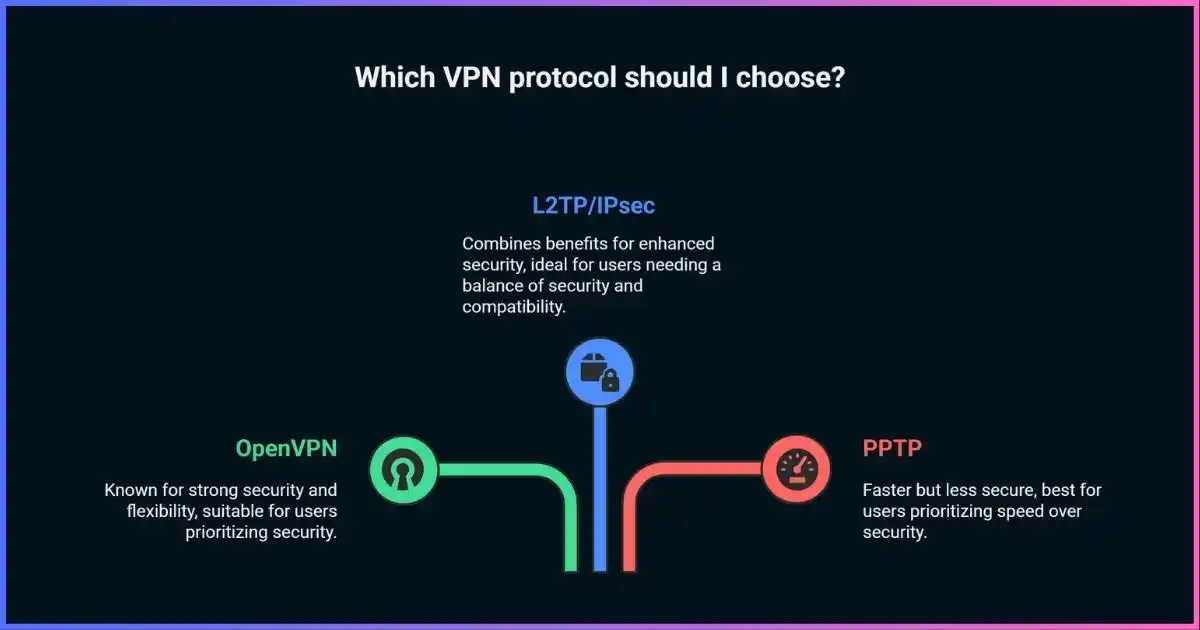
Use WireGuard for everyday speed, gaming, streaming, and mobile use. Choose OpenVPN UDP when you need mature interoperability or broad configuration support. Try OpenVPN TCP on port 443 or a provider’s obfuscated mode when a network blocks UDP, understanding that TCP is not invisibility. Choose IKEv2/IPsec for native OS integration, enterprise deployments, and reliable Wi-Fi-to-cellular roaming.
Avoid PPTP. Treat L2TP/IPsec and SSTP as compatibility options, not first choices for a new consumer setup. If your app offers Automatic, that is usually sensible: good clients select a fast protocol and fall back when the network interferes.
Table of Contents
FoundationHow a VPN Protocol Builds the Tunnel
When you tap Connect, the app contacts a VPN endpoint, authenticates the server and usually the client, agrees on short-lived session keys, creates a virtual network interface, and installs routes and DNS settings. It wraps your original packets inside protected transport packets. The server removes that outer wrapper, forwards the traffic, and reverses the process for replies.
The protocol determines the handshake, cryptographic suite, packet format, transport, rekeying, peer authentication, and behavior when your address changes. The app separately controls safeguards such as the kill switch, DNS routing, split tunneling, server choice, and obfuscation.
Protocol, encryption, and service are not the same
A strong protocol cannot rescue a malicious provider, leaky app, or compromised device. Review the provider’s logging policy and test IP, DNS, IPv6, and reconnect behavior.
At a glanceVPN Protocol Comparison Table
| Protocol | Transport | Security when current | Strengths | Limitations | Best fit |
|---|---|---|---|---|---|
| WireGuard | UDP only | Strong, fixed modern suite | Low overhead, quick handshakes, roaming | No native TCP or obfuscation | Default use, mobile, gaming |
| OpenVPN | UDP or TCP | Strong with current TLS/AEAD | Mature, configurable, cross-platform | Complex; TCP can be slow; legacy configs vary | Compatibility, self-hosting |
| IKEv2/IPsec | Usually UDP 500/4500 + ESP | Strong with modern proposals | MOBIKE roaming, native OS integration | Easy to block; configuration varies | Phones, managed fleets |
| L2TP/IPsec | UDP 500/4500/1701 + ESP | IPsec can be strong | Legacy built-in support | Extra encapsulation, fixed ports, PSK risk | Legacy compatibility |
| SSTP | TCP 443 over TLS | Potentially strong | Passes basic firewalls; Windows integration | TCP-over-TCP; Microsoft-centric | Existing Windows use |
| PPTP | TCP 1723 + GRE | Obsolete / unsafe | Historical compatibility | Broken MS-CHAPv2 security | Do not use |
Results depend on the app, server, cipher configuration, hardware, network path, MTU, congestion, and implementation. Protocol names alone do not guarantee performance or security.
Practical protocol characteristics
Qualitative engineering comparison—not benchmark data. Longer bars mean a stronger fit for the named characteristic.
Modern defaultWireGuard: Lean, Fast, and Mobile-Friendly
WireGuard deliberately limits choice. Its official protocol uses the Noise_IK handshake, Curve25519 for key agreement, ChaCha20-Poly1305 authenticated encryption, BLAKE2s hashing, and HKDF key derivation. All packets travel over UDP. This compact, opinionated design reduces negotiation complexity and enables efficient kernel or userspace implementations.
WireGuard automatically rotates session keys and learns a peer’s most recent authenticated endpoint. That roaming behavior is why a phone can often move from home Wi-Fi to cellular data without rebuilding the whole tunnel. It is especially attractive on modest CPUs that lack fast AES hardware.
Where WireGuard excels
- Low overhead and rapid connection setup
- Reliable roaming between interfaces
- Small protocol and implementation surface
- No legacy cipher negotiation
Trade-offs
- UDP-only; blocked UDP needs a fallback
- No built-in traffic obfuscation
- Static public keys need careful service-level handling
- Not post-quantum secure by default
Commercial providers commonly modify the control plane around WireGuard. NordLynx adds a double-NAT system; other services dynamically allocate addresses, rotate keys, or avoid retaining durable subscriber-to-tunnel mappings. These address service privacy and scale, not a flaw in ChaCha20 encryption.
Flexible veteranOpenVPN: Mature, Configurable, and Widely Supported
OpenVPN is an open-source TLS-based VPN using a TUN or TAP virtual interface. It supports certificates, UDP or TCP transport, NAT and proxy traversal, many operating systems, and extensive server policy. Its flexibility explains both its longevity and its risk: two connections labeled “OpenVPN” can use very different settings.
Current OpenVPN 2.6 configurations negotiate authenticated-encryption ciphers. Its documented default list uses AES-256-GCM and AES-128-GCM, adding ChaCha20-Poly1305 where available. Data Channel Offload can move eligible packet processing into the kernel and narrow the old performance gap. Advice treating every OpenVPN connection as “AES-256-CBC with RSA-2048” is outdated.
OpenVPN UDP vs TCP
TCP-over-TCP can amplify delay when both inner and outer streams retransmit or reduce their windows. Use it for reachability, not as a universal “more reliable” mode.
OpenVPN configuration checks
- Prefer AEAD data ciphers such as AES-GCM or ChaCha20-Poly1305.
- Use TLS mode and current certificates; static-key mode is deprecated.
- Disable compression unless a controlled legacy dependency requires it.
- Keep clients and servers maintained; avoid weak compatibility settings.
- Verify DNS, IPv6, routes, kill-switch behavior, and MTU.
Want one app to handle protocol selection? ExpressVPN automatically chooses a suitable protocol and includes Lightway alongside OpenVPN.
Get ExpressVPN →Native mobilityIKEv2/IPsec: Strong Roaming and Enterprise Integration
IKEv2 is the control protocol that authenticates peers, negotiates algorithms, and creates IPsec Security Associations; IPsec carries the protected traffic. Calling the pair “IKEv2 encryption” skips an important distinction: the IPsec proposal, certificate or EAP authentication method, key sizes, and client validation determine the actual security.
IKEv2 normally starts on UDP 500 and uses UDP 4500 when NAT traversal is needed. The MOBIKE extension lets a client change its outer address while keeping the security association alive—excellent for devices switching between Wi-Fi and cellular. Native Apple and Microsoft support plus device-management integration make it an enterprise favorite.
Strengths
- Fast re-establishment and excellent roaming
- Certificate, EAP, and enterprise authentication
- Mature IPsec standards and OS integration
- Efficient data path on good implementations
Limitations
- UDP 500/4500 and IPsec signatures are easy to block
- Complex proposals can be insecure or incompatible
- Broadly shared secrets are risky
- Available algorithms differ across OS clients
Compatibility cornerL2TP/IPsec, SSTP, and PPTP
L2TP/IPsec: tunneling plus separate encryption
L2TP carries PPP frames but does not encrypt them; IPsec authenticates and protects the tunnel. The layered design adds encapsulation, relies on recognizable ports, and often uses a group pre-shared key. Microsoft does not recommend L2TP or PPTP for new deployments, and new Windows Server 2025 RRAS setups no longer accept them by default.
Use L2TP/IPsec only when an existing device has no supported modern alternative. A long, unique PSK plus per-user authentication is better than a reused PSK, but migration to IKEv2, OpenVPN, or WireGuard should be the plan.
SSTP: HTTPS transport with a Windows bias
SSTP carries PPP over TLS-protected HTTPS, normally TCP 443. It can pass basic firewall rules but inherits TCP-over-TCP problems and is less portable than OpenVPN. Microsoft is retiring SSTP for Azure VPN Gateway: enabling it ends August 31, 2026, and existing SSTP gateway connections end March 31, 2027. This does not remove SSTP from every Windows deployment, but it is a clear migration signal.
PPTP: obsolete and unsafe
PPTP commonly pairs MPPE with MS-CHAPv2. MS-CHAPv2’s effective security can be reduced to a single DES-key search, so captured handshakes can be cracked cheaply. PPTP also depends on GRE, which causes NAT and firewall trouble. Never use it for privacy, remote work, or account access.
Provider variantsLightway, NordLynx, and Custom Protocols
“Proprietary” does not automatically mean insecure, and “open source” does not automatically make a service trustworthy. Ask whether code or specifications are public, whether independent reviews cover the current version, how findings are fixed, and whether fallback is safe.
| Name | Provider | Foundation | What it changes | Verify |
|---|---|---|---|---|
| Lightway | ExpressVPN | wolfSSL; UDP or TCP | Compact design, fast reconnection, current post-quantum protection | Platform support and fallback |
| NordLynx | NordVPN | WireGuard | Double-NAT control layer avoids a persistent user-to-tunnel-IP mapping | Use provider apps |
| Stealth modes | Various | Varies | Changes traffic appearance or transport | Protocol, platform, threat model |
Prefer providers publishing technical details, audits, and limitations. Our VPN selection guide covers service-level questions beyond the tunnel.
No fake speed league tableWhat Actually Determines VPN Performance?
No universal claim that one protocol retains a fixed baseline percentage is defensible. A nearby uncongested WireGuard server may dominate, while OpenVPN with DCO and AES hardware can compete on a fast desktop. A distant server, overloaded gateway, poor peering, lossy Wi-Fi, or MTU issue can overwhelm the protocol difference.
- Distance and routing: propagation and peering.
- Server load: CPU, NIC, and contention.
- Access network: Wi-Fi loss, cellular, and shaping.
- Protocol path: kernel/userspace, cipher acceleration, UDP/TCP.
- Packet sizing: MTU and fragmentation.
Conceptual factor map, not measured shares. Segment size is illustrative.
A fair protocol benchmark
- Use the same device, provider, server city, and time window.
- Record several no-VPN samples for download, upload, latency, and loss.
- Test protocols in randomized order with reconnects between runs.
- Repeat tests; report median and range, not the best result.
- Test roaming, sleep/wake, and server switching—not throughput alone.
- Confirm the selected protocol in app logs or connection details.
Threat modelWhich VPN Protocol Is Most Secure?
WireGuard, correctly configured OpenVPN, and modern IKEv2/IPsec are all credible. WireGuard minimizes algorithm agility and complexity. OpenVPN brings a long deployment history and flexible certificates. IKEv2/IPsec offers standardized enterprise authentication and mature integration. Implementation, configuration, updates, and endpoint security matter more than a universal winner.
Security checklist across protocols
A VPN protects traffic between your device and its server. It does not remove malware, stop phishing, make an account anonymous, or replace HTTPS. Learn the limits in our VPN privacy and security guide.
Decision guideBest VPN Protocol by Use Case
| Scenario | Start with | Fallback | Why |
|---|---|---|---|
| Everyday browsing | Automatic or WireGuard | OpenVPN UDP | Low friction and efficiency |
| Streaming | WireGuard / modern provider protocol | OpenVPN UDP | Throughput and quick server changes |
| Gaming | WireGuard | IKEv2/IPsec | Low overhead and recovery |
| Phone or tablet | WireGuard or IKEv2 | Automatic mode | Roaming and reconnection |
| Blocked UDP | Provider stealth mode | OpenVPN TCP 443 | Reachability through restrictions |
| Heavy censorship | Audited obfuscated protocol | Provider fallback | Standard signatures can be detected |
| Enterprise native client | IKEv2/IPsec | OpenVPN | Management, certificates, SSO/EAP |
| Router / self-hosted | WireGuard | OpenVPN UDP | Efficiency; mature fallback tooling |
| Legacy equipment | L2TP/IPsec temporarily | Upgrade | Migration bridge only |
For activity-specific provider testing, see the best streaming VPNs, best gaming VPNs, and best travel VPNs.
Practical setupHow to Switch Protocols and Troubleshoot
- Open the app’s protocol setting. Look under Settings, Connection, VPN protocol, or Advanced.
- Start with Automatic. It accounts for platform support and blocking.
- For speed or battery issues, try WireGuard or the provider’s modern protocol and a nearby server.
- For mobile transitions, compare WireGuard and IKEv2. Test sleep and Wi-Fi/cellular changes.
- For connection failure, use obfuscation or TCP fallback. Complete captive-portal login first.
- Retest privacy controls. Verify public IP, DNS, IPv6, and kill switch after changes.
Quick clarificationsFrequently Asked Questions
Is WireGuard always faster than OpenVPN?
Is OpenVPN still secure?
Is IKEv2 the same as IPsec?
Does TCP port 443 make OpenVPN undetectable?
Why does WireGuard use UDP only?
Can I run two VPN protocols at once?
Which protocol is best for a VPN router?
Should I ever use PPTP?
Final Verdict
WireGuard is the best starting protocol for most people because it combines modern cryptography, low overhead, quick setup, and roaming. OpenVPN remains the compatibility and configurability champion, particularly when UDP is restricted or third-party profiles matter. IKEv2/IPsec is an excellent native and enterprise option with strong mobility.
Avoid PPTP, migrate from L2TP/IPsec where practical, and treat SSTP as an existing-environment tool. The safest choice is a maintained protocol inside a trustworthy app, with verified DNS routing, a working kill switch, current software, and a provider whose operations withstand scrutiny.
Sources & comparison methodology
This guide compares specifications, current vendor documentation, platform guidance, security properties, transports, mobility, configuration risk, and deployability. Performance visuals are qualitative because universal speed percentages mislead; the benchmark section supplies a reproducible method.
- WireGuard: Protocol & Cryptography — handshake, primitives, key rotation, and UDP.
- OpenVPN 2.6 manual — transport, cipher negotiation, deprecated modes, and DCO.
- IETF RFC 7296 and RFC 4555 — IKEv2 and MOBIKE.
- IETF RFC 2661 and RFC 3193 — L2TP and L2TP/IPsec.
- Microsoft Windows VPN/RRAS documentation — protocol support and current deployment guidance.
- Microsoft Azure VPN Gateway documentation — SSTP retirement and migration.
- WireGuard known limitations — obfuscation, TCP, roaming, identity, and post-quantum boundaries.
Editorial rule: no protocol receives a numeric security or speed score without a controlled, reproducible test. “Strong” assumes a supported implementation, modern algorithms, correct authentication, and current patches.