SafeShell VPN Review
SafeShell VPN is a streaming-first VPN with one genuinely distinctive idea: App Mode can send Netflix through one country, Prime Video through another, and an ordinary browser outside the tunnel—all at the same time. That makes it unusually convenient on Apple TV and other living-room devices. But this SafeShell VPN review also found short refund terms, inconsistent network figures, only five simultaneous devices, no clearly published independent no-logs audit, and a privacy policy that deserves closer scrutiny.
Our verdict: excellent streaming specialist, average privacy value
Choose SafeShell for app-by-app country routing, native TV apps, streaming routes, Game Mode, and easy regional switching. Choose an audited privacy leader instead if your priority is high-risk anonymity, transparent infrastructure, a clearly documented kill switch, or a long refund window.
Table of Contents
- Quick answer
- SafeShell at a glance
- Company and positioning
- Pricing, trial and refunds
- App Mode vs Global Mode
- Features in detail
- Security and privacy
- Servers and performance
- Streaming and TV apps
- Gaming and P2P
- Apps and device support
- Setup and troubleshooting
- SafeShell vs competitors
- Pros and cons
- Frequently asked questions
- Final verdict
- Sources and methodology
The short versionIs SafeShell VPN Good?
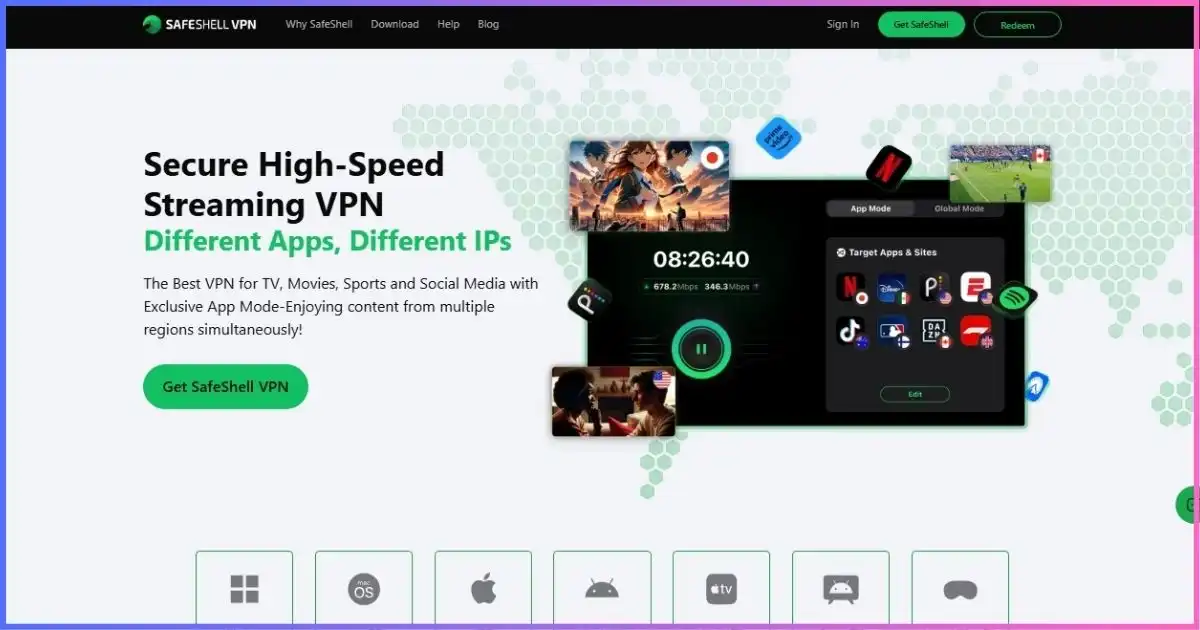
SafeShell VPN is good for streaming households, frequent region switchers, Apple TV users, and casual gamers. App Mode is more useful than ordinary split tunneling because supported apps can use several VPN countries concurrently. ShellGuard and Stealth cover everyday encrypted routing and harder-to-block connections, while dedicated streaming and gaming routes keep the interface focused.
It is not our first choice for sensitive privacy work. SafeShell markets a no-logs service, but we did not find a clearly published independent no-logs audit, its general privacy policy describes substantial device and service telemetry, and current support materials do not clearly document a system-wide kill switch on each platform. It ranks as a specialist in our best VPN providers comparison, not as the most transparent all-purpose VPN.
SafeShell editorial scorecard
Our 10-point, evidence-based assessment—not laboratory speed-test results.
- Streaming flexibility9.2
- Apps and TV support8.7
- Performance features8.3
- Long-term value6.8
- Privacy transparency5.8
BackgroundWhat Is SafeShell VPN, and Who Owns It?
SafeShell is a consumer VPN operated by GearUp Portal Pte. Ltd., a Singapore company listed at 1 Raffles Quay. Its product DNA is different from a traditional privacy-first VPN: the interface and help center lead with streaming, app-specific regional routing, game acceleration, subtitles, and smart-TV access rather than audits, open-source clients, or advanced manual configuration.
That positioning is not inherently bad. For a household that wants Korean programming in one app, US sports in another, and local browsing everywhere else, SafeShell addresses a real nuisance. The distinction matters because a streaming specialist should not automatically be evaluated as if it were a hardened anonymity system.
Best fit
Apple TV and Android TV viewers, expats, multilingual households, sports fans, frequent app-region switchers, and players who want guided game routes.
Look elsewhere if
You need an audited no-logs record, open-source apps, clearly documented fail-closed behavior, port forwarding, unlimited devices, or a 30-day-plus refund period.
Plans and fine printSafeShell VPN Pricing, Free Trial, and Refund Policy
SafeShell’s direct web checkout is dynamic, so displayed offers can change with region, device, promotion, currency, and payment route. For a stable reference point, the US Apple App Store listed the following in-app prices when this review was updated. Treat them as a snapshot, not a worldwide guarantee.
The weekly plan is convenient for a short event or trip but works out to roughly $25.96 per average month if repeatedly renewed. The annual listing saves about 49% against twelve monthly payments, yet $6.67 per month is still more expensive than many established VPNs’ long-term introductory offers.
Effective monthly cost by SafeShell plan
US App Store snapshot. Weekly equivalent uses 52 weeks ÷ 12 months; taxes and regional prices may differ.
The seven-day guarantee has important exclusions
The headline “7-day money-back guarantee” is narrower than it sounds. SafeShell’s refund page says it applies to eligible first-time purchases made directly through its official website. Renewals are not refundable. Apple App Store and Google Play transactions go through those stores’ own refund processes, while reseller purchases must be taken back to the reseller. SafeShell says eligible direct requests may take up to 10 business days to process.
SafeShell also advertises non-renewing weekly and monthly cryptocurrency passes. These can reduce billing-linkage and auto-renewal concerns, but availability, exchange fees, blockchain fees, and refund mechanics differ from card or PayPal purchases.
The standout featureApp Mode vs Global Mode: Why SafeShell Feels Different
Global Mode behaves like a conventional VPN: choose one location and SafeShell sends device traffic through that route. A Bypass Apps option can exempt selected software so it continues to use the normal connection.
App Mode flips the model. You assign supported apps—or, in newer versions, custom website domains—to different regions independently. A household could route one streaming app through South Korea, another through the United States, and leave banking or local delivery apps on the regular connection without repeatedly disconnecting and changing the whole device’s location.
| Mode | How traffic is routed | Best use | Main limitation |
|---|---|---|---|
| Global Mode | Most device traffic uses one selected VPN region; chosen apps can bypass it. | Public Wi-Fi, general browsing, one-country streaming | Only one VPN destination at a time |
| App Mode | Different supported apps or domains can use different VPN regions concurrently. | Multi-region TV households and app-specific access | Support and available regions vary by app, platform, and time |
| Game Mode | Selected game traffic follows an optimized game route. | Route stability, regional game access, IP masking | Cannot guarantee lower ping; supported games/devices differ |
Feature-by-featureWhat SafeShell VPN Includes
ShellGuard
SafeShell’s proprietary everyday protocol uses TLS 1.3 according to its protocol guide. It is the default choice for speed and stability on ordinary networks.
Stealth Protocol
A QUIC-based obfuscated mode designed to make VPN traffic harder to classify. SafeShell notes that some ISPs throttle QUIC, so Stealth can be slower.
SafeNet
Blocks supported ads, trackers, and malicious domains while the VPN is connected. Some ad-free routes are region-specific, and embedded streaming ads are not universally removable.
Subtitle translation
Selected clients can display original and translated subtitles together across 30-plus languages—a niche but useful accessibility feature for international viewing.
Game Mode
Offers title- and region-aware routes plus Dual Assurance on supported devices, which can compare Wi-Fi and mobile-data paths for stability.
P2P support
The live server directory marks P2P/BitTorrent availability by region. Public support material does not establish a current VPN-side port-forwarding workflow.
SafeNet has platform and content limits
SafeNet only works while a SafeShell VPN connection is active. The provider’s FAQ says it cannot remove advertisements embedded directly inside Netflix or Disney+ streams, and feature availability is not identical across phones, computers, and TV apps. Treat it as a helpful DNS/network filter, not a complete replacement for browser-level content controls.
IPv6, DNS handling, and unlimited bandwidth
SafeShell advertises IPv6 support, in-house DNS handling, DNS leak protection, unlimited bandwidth, AES-256-GCM encryption, and forward secrecy. Those are appropriate foundations. The security value still depends on correct implementation, platform parity, and independent verification—areas where SafeShell publishes less detail than the most transparent providers.
Trust analysisSafeShell VPN Security and Privacy
At the tunnel level, SafeShell lists sensible modern ingredients: AES-256-GCM, per-session forward secrecy, DNS leak protection, TLS 1.3-based ShellGuard, QUIC-based Stealth, IP masking, and anti-DDoS protection at its servers. AES is a standardized symmetric encryption family maintained in the federal standards ecosystem; readers who want the underlying definition can consult the NIST AES glossary.
However, a list of cryptographic terms is not a complete trust case. Three issues prevent SafeShell from scoring higher for privacy.
1. The no-logs claim is not independently substantiated
SafeShell’s marketing and app-store description say it stores neither online activity nor connection logs. We did not find a clearly published independent no-logs audit or infrastructure assessment in the public materials reviewed. That does not prove the claim false; it means customers are being asked to trust the provider’s wording without the same level of external evidence available from leading audited competitors.
2. The privacy policy is broad
The April 7, 2025 privacy policy covers GearUp services broadly and describes collection that may include account and transaction information, city/country/region inferred from IP, IP and MAC addresses, device identifiers, ISP, operating system, timestamps, crash and diagnostic information, ping/performance data, usage preferences, and communications. Some categories may support app operation, security, payments, or game-related services, but the policy does not clearly reconcile that breadth with the simple “zero logs” slogan.
3. Kill-switch documentation is unclear
A SafeShell blog post references a kill switch, yet the current feature and help pages we reviewed do not clearly document how a system-wide kill switch behaves across Windows, macOS, Android, iOS, and TV platforms. Until the exact app shows and explains that control, do not assume it provides fail-closed protection for sensitive transfers.
A VPN protects traffic between your device and its VPN endpoint; it does not turn a phishing page into a safe site, repair an unpatched device, or replace multifactor authentication. The FTC’s public Wi-Fi guidance is a useful reality check: HTTPS has improved baseline safety, while software updates, secure accounts, and scam awareness still matter.
InfrastructureServer Network and Expected Performance
SafeShell’s official network figures do not line up neatly. On September 18, 2026, its live server directory displayed 61 regions and 2,000+ servers, plus “up to 10 Gbps” connectivity in most locations. The features page separately advertised 100+ locations, while a help article stated 10,000+ server nodes in 40+ countries.
| Official figure | Likely unit | What it does—and does not—tell you |
|---|---|---|
| 61 regions / 2,000+ servers | Live selectable directory and physical/virtual server fleet | Most concrete current directory snapshot; regions are not necessarily countries |
| 100+ locations | Broader marketing locations/routes | May count cities, route variants, or app-specific destinations |
| 10,000+ nodes / 40+ countries | Provider-defined nodes | Nodes may not equal independent VPN servers; country scope is smaller than the location total |
Because those units are not reconciled publicly, we use the live 61-region/2,000-plus-server directory for the most conservative comparison. A large node count does not guarantee speed. Distance, congestion, ISP peering, Wi-Fi quality, chosen protocol, streaming service, and time of day matter more to an individual session.
What the 10 Gbps claim means
A 10 Gbps server uplink is shared capacity, not the speed one subscriber should expect. Your result is capped by the home connection, device, route, encryption overhead, server load, and destination. Start with ShellGuard and a nearby region; switch to Stealth only when ordinary VPN traffic is blocked or unstable.
Strongest use caseStreaming Performance and Smart-TV Experience
SafeShell makes the most sense as a streaming VPN. Dedicated routes and App Mode reduce the constant connect–disconnect cycle that ordinary VPNs impose on multi-region households. The service supplies native or direct-download clients for Apple TV, Android/Google TV, iOS, Android, Windows, macOS, and Apple Vision Pro. Fire TV appears in provider marketing and use-case material, but the exact installation path should be checked for your Fire TV generation because the main download page does not list it as a separate tile.
The practical advantage is workflow, not a permanent promise that every catalog will work. Streaming platforms rotate IP blocks, licensing rules vary by account and country, and an app update can change behavior overnight. Our broader best VPNs for streaming guide explains how SafeShell compares with more established all-purpose options.
What about subtitles?
SafeShell’s dual-subtitle translation can display original and translated text together in 30-plus languages on supported content and clients. This is a meaningful differentiator for language learners and international households, though availability depends on the source title, subtitle track, app, and platform.
SafeShell is built for region-hopping viewers
If App Mode solves your actual problem, test every required service and device immediately. The direct-purchase refund window is only seven days.
Try SafeShell for Streaming →Specialized modesGaming, DDoS Protection, and Torrenting
Gaming
Game Mode offers optimized routes for supported titles and regions. SafeShell says it focuses on ping stability, packet loss, and response consistency; Dual Assurance can monitor Wi-Fi and mobile data on supported devices and choose the better path. Routing through a VPN also hides the residential public IP from direct peers, which can reduce exposure to IP-targeted DDoS attacks.
Those benefits are conditional. A VPN adds another hop and can increase latency when your ISP already has a good route. It cannot repair weak Wi-Fi, an overloaded game server, general congestion, hardware bottlenecks, or attacks against the game operator. Compare it with the lower-latency and router-focused choices in our best gaming VPN roundup.
P2P and torrenting
SafeShell’s live directory labels which regions support P2P/BitTorrent. App Mode can keep a torrent client inside a selected VPN route while unrelated apps use the normal connection. The weakness is documentation: we did not find a dependable current workflow for VPN-side port forwarding or a clearly documented kill switch across platforms.
BitTorrent works without inbound port forwarding, but smaller swarms and seeding may suffer. For regular P2P use, a VPN with documented port forwarding, adapter binding guidance, and a verified kill switch is easier to trust; see our top VPNs for torrenting. Only download material you are legally allowed to share, and remember that a VPN does not scan every file or prevent accidental folder sharing.
Platform coverageSafeShell Apps and Device Limits
| Platform | Availability | What to verify |
|---|---|---|
| Windows | Native download | App Mode/domain routing, protocol choices, and whether the current build exposes a kill switch |
| macOS | Native/App Store client | Feature parity can differ by distribution route |
| iPhone/iPad | App Store; iOS 15+ listed | Auto-renewal, per-app controls, and iOS background behavior |
| Android | Google Play and APK | Game Mode, SafeNet, split-by-app behavior, and battery optimization |
| Apple TV | Native; tvOS 17+ listed | App Mode service list and region availability |
| Android/Google TV | Native TV download | Remote-friendly controls and SafeNet parity |
| Fire TV | Promoted by provider | Installation method and model/Fire OS compatibility |
| Apple Vision Pro | Native listing | App Mode and feature parity |
| Routers/consoles/Linux | No prominent first-class download in reviewed materials | Do not assume manual configuration or native support |
The five-device allowance is enough for one person but restrictive for a family with phones, laptops, and TVs. Unlike unlimited-device providers, SafeShell may force device management before everyone can connect.
Practical guideHow to Set Up SafeShell VPN Correctly
- Choose the billing channel deliberately. Direct purchases have SafeShell’s conditional seven-day guarantee; Apple and Google purchases use the store’s refund process. Record the renewal date.
- Install only from the official site or app store. Sign in with the same account ecosystem used for the subscription, especially when restoring a purchase.
- Start with Global Mode and ShellGuard. Choose a nearby server to establish a performance baseline before trying special routes.
- Configure App Mode selectively. Assign only the apps or domains that need a foreign region. Keep local banking, shopping, printers, and delivery services on their normal route when appropriate.
- Test for leaks and drop behavior. Check the visible public IP and DNS route, then interrupt Wi-Fi briefly to learn whether the exact app fails closed or exposes the normal connection.
- Test the real workload. Play a complete streaming title, join the game region, or run an authorized P2P transfer. A successful login screen is not enough.
- Set a cancellation reminder. Trial and subscription billing can renew automatically. Cancel at least 24 hours early if you do not intend to continue.
Troubleshooting checklist
- Streaming app still shows the wrong region: force-close it, connect the desired route first, reopen it, and clear app cache where the platform permits.
- Slow connection: return to ShellGuard, select a geographically closer endpoint, disable unnecessary multi-app routes, and compare Ethernet with Wi-Fi.
- Stealth is slower: QUIC can be throttled by some networks; use Stealth for blocking resistance, not automatically for every connection.
- Subscription missing: use Restore Purchase and confirm that the device is signed into the same Apple or Google account that paid.
- One app bypasses the VPN: review its App Mode/Bypass assignment and repeat the public-IP check from inside that app or browser profile.
Market contextSafeShell VPN vs NordVPN, Surfshark, PIA, and IPVanish
SafeShell wins on multi-region app routing and loses on privacy verification, refund length, and price-to-device value. The comparison below uses current provider-quoted introductory long-term pricing; these plans have different term lengths, upfront totals, renewals, taxes, and eligibility.
| VPN | Long-term entry price* | Network snapshot | Devices | Refund | Best reason to choose it |
|---|---|---|---|---|---|
| SafeShell | $6.67/mo equivalent on $79.99 US App Store year | 61 regions / 2,000+ servers in live directory | 5 | 7 days, eligible direct first purchase | Different apps connected to different countries simultaneously |
| NordVPN | $3.49/mo | 8,027 servers / 150 countries | 10 | 30 days | Audited, broad all-purpose feature set |
| Surfshark | $2.49/mo | 4,500+ servers / 100 countries | Unlimited | 30 days | Household value and unlimited devices |
| Private Internet Access | $2.03/mo | 91 countries / 154 locations | Unlimited | 30 days | Customization and documented P2P tools |
| IPVanish | $2.19/mo | 3,400+ servers / 55 countries / 150 locations | Unlimited | 30 days on eligible annual terms | Unlimited-device US households |
*Introductory monthly equivalents, usually billed upfront. SafeShell figure is a US App Store listing; competitor offers and renewals differ. Check final checkout totals.
Advertised long-term monthly equivalent
Lower is cheaper. Different commitments and renewal terms make this a price snapshot, not lifetime cost.
Which alternative is closest?
NordVPN is the stronger all-purpose and privacy-evidence choice; read our NordVPN vs SafeShell comparison. Surfshark is better for a large device household and usually costs less long-term; see Surfshark vs SafeShell. If P2P controls and customization matter, compare PIA vs SafeShell. US households interested in unlimited connections can also review IPVanish vs SafeShell.
Balanced assessmentSafeShell VPN Pros and Cons
Pros
- App Mode can route different apps or domains through different countries concurrently
- Strong native support for Apple TV, Android/Google TV, mobile, desktop, and Vision Pro
- Streaming, Game Mode, P2P, subtitle translation, and SafeNet in one simple interface
- ShellGuard and Stealth address normal speed and blocking-resistant connections
- Current live directory labels streaming, P2P, SafeNet, and protocol availability by region
Cons
- Only five simultaneous devices
- Seven-day refund is short and excludes app-store purchases from SafeShell’s own guarantee
- No clearly published independent no-logs audit found
- Broad privacy-policy collection language conflicts with a simple “zero logs” impression
- Kill-switch behavior is not clearly documented across current apps
- Official network totals use inconsistent units
- Annual App Store price is high beside major long-term competitors
Common questionsSafeShell VPN Review FAQs
Is SafeShell VPN safe?
SafeShell lists AES-256-GCM, forward secrecy, DNS leak protection, ShellGuard, Stealth, and server-side anti-DDoS protection, which are credible security foundations. For ordinary streaming and everyday use, that is reasonable. For high-risk privacy, the absence of a clearly published independent no-logs audit, broad privacy-policy language, and unclear cross-platform kill-switch documentation are meaningful drawbacks.
Does SafeShell VPN keep logs?
SafeShell markets a no-online-activity and no-connection-logs policy. Its broader privacy policy nevertheless describes account, device, network, location, timestamp, diagnostic, performance, and usage-related collection across GearUp services. Because no clearly published independent no-logs audit was found, we would describe the claim as provider-asserted rather than independently verified.
How much does SafeShell VPN cost?
The US Apple App Store listed $5.99 weekly, $12.99 monthly, and $79.99 annually ($6.67 per month equivalent) when checked. Direct-web, Android, regional, promotional, and crypto-pass prices can differ, so confirm the upfront total and renewal terms at checkout.
Does SafeShell have a free trial?
SafeShell advertises a free trial for eligible new users, with the exact length shown during signup. Trials can convert to an auto-renewing paid subscription unless canceled at least 24 hours before the trial ends. Store and regional availability varies.
Can SafeShell connect different apps to different countries?
Yes. That is App Mode’s main purpose. Supported apps—and in newer releases, custom domains—can be assigned separate VPN destinations at the same time. It is app-specific split routing, not a multi-hop privacy route.
Does SafeShell work on Apple TV?
Yes. The App Store lists Apple TV compatibility with tvOS 17 or later. App Mode is especially useful there, but supported streaming apps and regional routes can change, so test your exact services promptly.
Is SafeShell good for gaming?
It can be useful when an optimized route improves poor ISP peering, for masking the residential IP, or for stabilizing a supported mobile game with Dual Assurance. It cannot guarantee lower ping and may add latency when the original route is already efficient.
Is SafeShell good for torrenting?
SafeShell marks P2P-capable regions and can route a torrent client through App Mode, but its public material does not provide the same clear port-forwarding and kill-switch documentation as the strongest torrenting VPNs. It is workable for casual authorized P2P, not our first power-user choice.
Does SafeShell offer a money-back guarantee?
Eligible first-time direct website purchases have a seven-day guarantee. Renewals are excluded. Apple and Google purchases follow the store’s refund decision, and reseller purchases must be handled by the reseller.
Final Verdict: Is SafeShell VPN Worth It?
SafeShell is worth considering when App Mode is the reason you are buying. No mainstream rival in this comparison makes concurrent, app-by-app country routing quite as central to the experience, and the TV-device support, streaming routes, subtitles, and Game Mode create a coherent entertainment package.
It is harder to recommend as a general-value or privacy-first subscription. Five devices, a seven-day conditional refund, an annual US App Store equivalent of $6.67 per month, inconsistent network disclosures, thin kill-switch documentation, and no clearly surfaced independent no-logs audit leave better options for those priorities.
Bottom line: 7.8/10. A clever, polished streaming specialist with a real differentiator—best bought after confirming that your exact apps, regions, and devices work during the applicable trial or refund window.
Affiliate disclosure: We may earn a commission if you purchase through a marked link, at no extra cost to you. Affiliate relationships do not change our scoring, caveats, or comparison methodology.
Sources & comparison methodology
Research date: September 18, 2026. This is a specification-, policy-, and use-case-based editorial review. We did not invent universal speed percentages or permanent streaming success rates; both vary by route, ISP, device, server load, service, and time.
Primary SafeShell materials reviewed: homepage; Features; Download; live VPN server directory; App Mode and Global Mode guides; ShellGuard and Stealth protocol guide; Game Mode and Dual Assurance guides; SafeNet FAQ; device, subscription, free-trial, and refund FAQs; Subscription Terms; User Agreement; Privacy Policy; US Apple App Store listing; and Google Play listing.
Comparison sources: current official pricing, network, device, refund, protocol, P2P, and privacy/audit disclosures for NordVPN, Surfshark, Private Internet Access, and IPVanish. Network terms are kept separate: a node, server, region, location, and country are not interchangeable.
Scoring weights: streaming and routing utility 25%; privacy and security transparency 25%; apps and usability 20%; performance-oriented features and network disclosure 15%; pricing, device allowance, and refund terms 15%. Scores are editorial judgments based on the published evidence available on the research date.
Pricing method: SafeShell’s numeric figures use the US Apple App Store listing because the direct checkout did not expose one stable worldwide price. Competitor figures are introductory long-term monthly equivalents and are normally charged upfront. Regional tax, currency, eligibility, bonus months, and renewal pricing can change the total.